Tutorials
One feature at a time: how to set it up, then every case you can run into, each with the real request and the real response. Every example was run against a self-hosted server: $AGENTRAAS_URL is http://localhost:13000 there, or https://agentraas.io on Cloud, and $AGENTRAAS_KEY is the agent's key from Connect agent.
The payment examples use mockpay, the built-in sandbox service, so nothing real is charged. It fails about one call in ten at random unless the payload says "fail": false, which is why the examples send it (the Failures tutorial sends "fail": true). Responses are shortened to the fields that matter (no timestamps or idempotency keys).
The whole loop in two minutes
- Connect an agent and send an action
- Safe retries (exactly once)
- Validation rules
- Human approval
- Spend caps and money caps
- Action policies and allowed hours
- Failures and the dead-letter queue
- Undo an action
- Record and replay
- Rules as code
- Library mode and the chaos tester
- LangChain and LangGraph tools
- MCP: scan and wrap a server
Start here if you don't write code
AgentRaaS sits between your AI agent and the services it uses (Stripe, email, Slack and others). Before anything happens, it checks the action: it stops repeats, keeps to the limits you set, asks a person before big actions, and keeps a record you can read and undo.
What needs a developer, once: pointing the agent at AgentRaaS. If your agent runs in Make, Zapier or n8n, you can do it yourself: + Connect agent, pick Make, Zapier or another HTTP tool, and paste the settings it shows (see Connect and send).
Everything else is in the dashboard, no code:
- Set limits an action must meet, like "amount at most 10000": Validation rules
- Approve big actions before they run, also from your phone through a Slack, Teams, Telegram, Discord or email link: Human approval
- Cap how much an agent can spend or do per day: Spend and money caps
- Say what each agent may never do, or only do for your own email domains or office hours: Action policies
- See every action and why it ran or stopped: Recent activity, click a row
- Send a failed action again once the cause is fixed: Failed requests
- Reverse an action, like refunding a charge: Undo
Each of those tutorials starts with In the dashboard, step by step: a recording and a picture for every click. You can skip the code boxes below it.
Words you will see
- Agent
- The AI program doing the work. Each one gets its own key.
- Service and action
- Where it acts and what it does there, like Stripe and charge.create (charge a card).
- Payload
- The details of one action, like the amount and the customer.
- Success
- It ran.
- Deduplicated
- A repeat of something that already ran, so it was not run again. The agent got the first answer back.
- Blocked
- One of your rules stopped it before it reached the service. Click the row to see which rule.
- Pending approval
- Waiting for a person to approve or deny it.
- Error
- The service itself refused it, for example a wrong key. It is listed in Failed requests.
Connect an agent and send an action
Every agent gets its own key. It sends each action to AgentRaaS, which checks it, runs it once and records it.
In the dashboard, step by step
No code needed. A recording of these exact clicks, then each step with a picture:
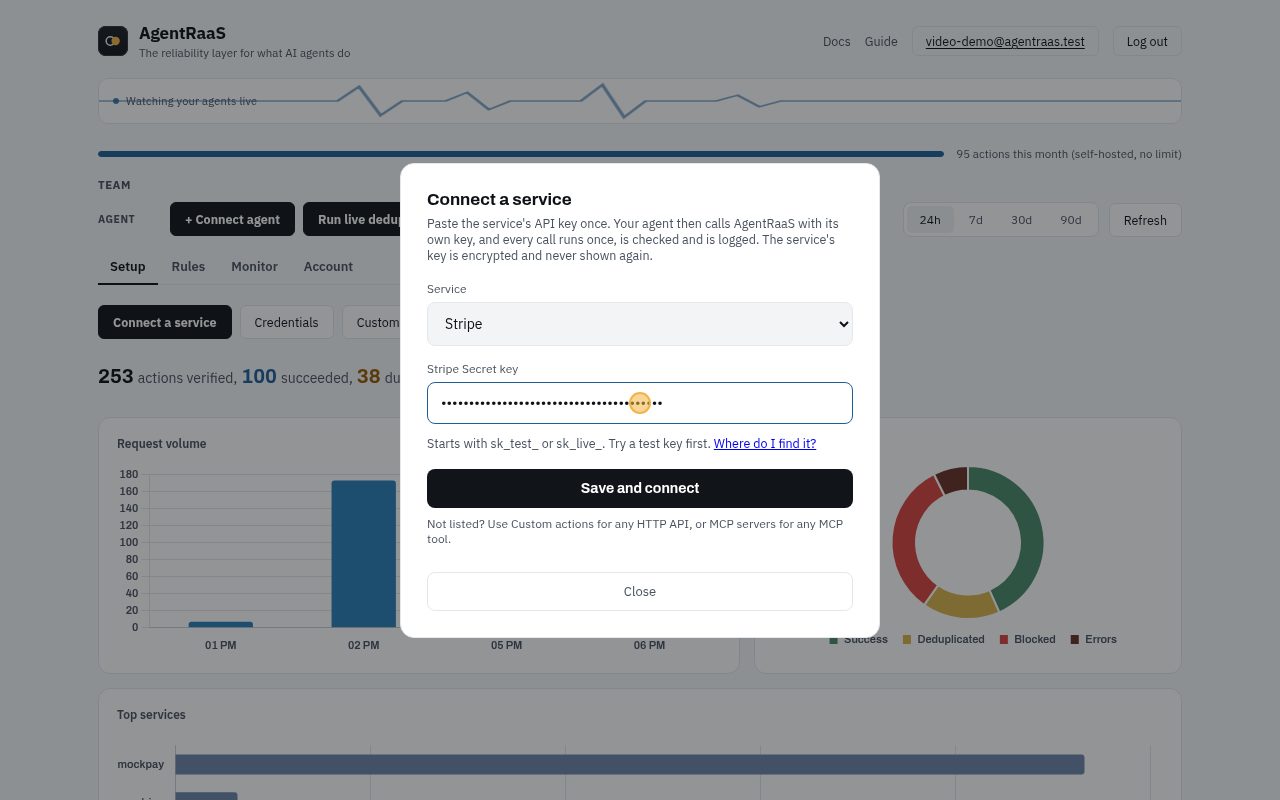
- Setup tab, Connect a service. Pick the service (here Stripe) and paste its API key. It is encrypted and never shown again.
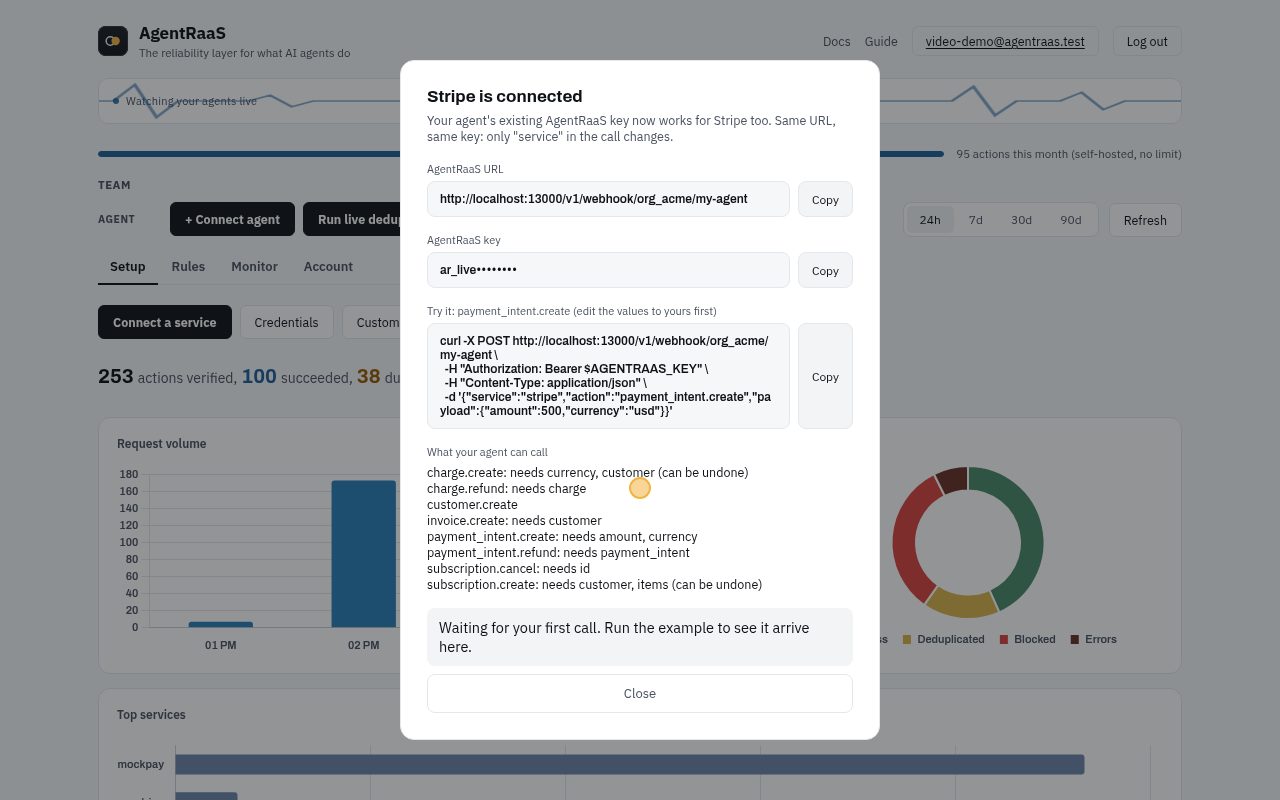
- Give your agent (or your developer) the AgentRaaS URL and key shown here. The key is shown only once.
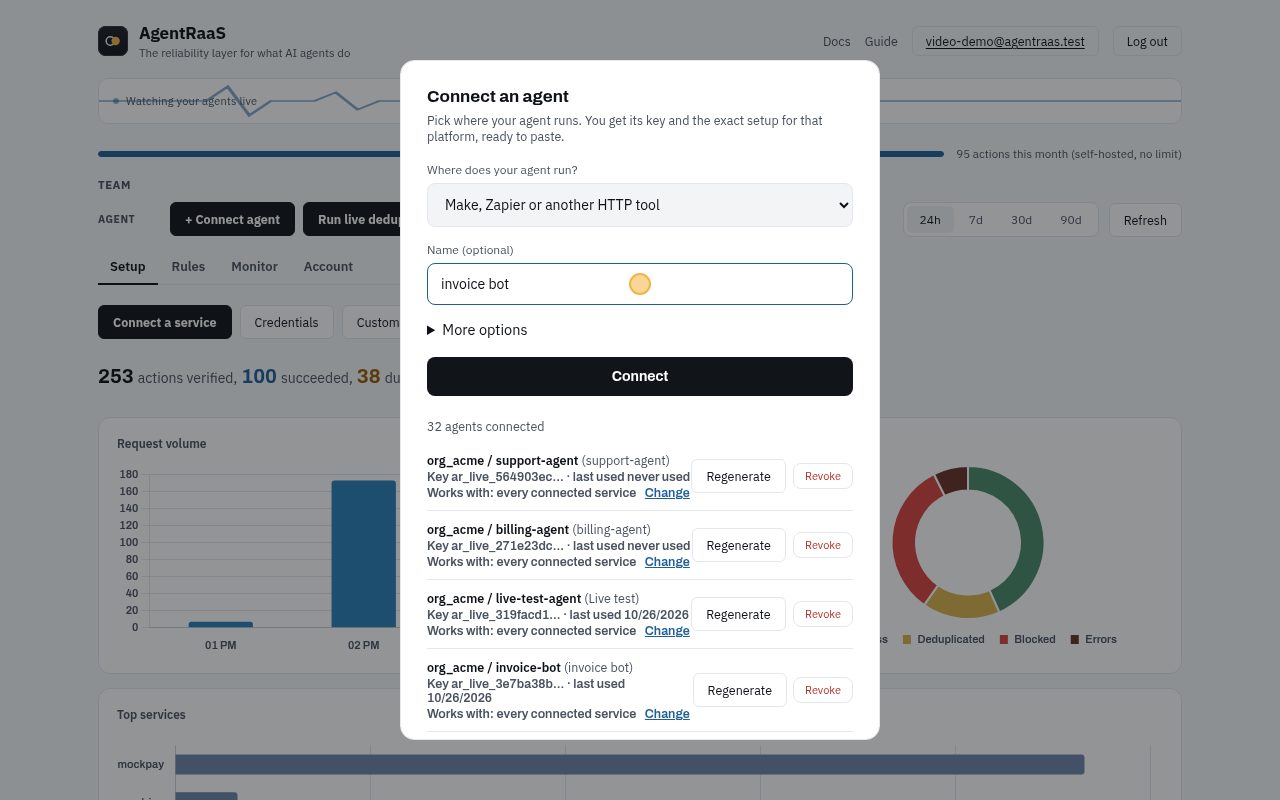
- One key per agent: + Connect agent, pick where it runs (here Make, Zapier or another no-code tool) and name it.
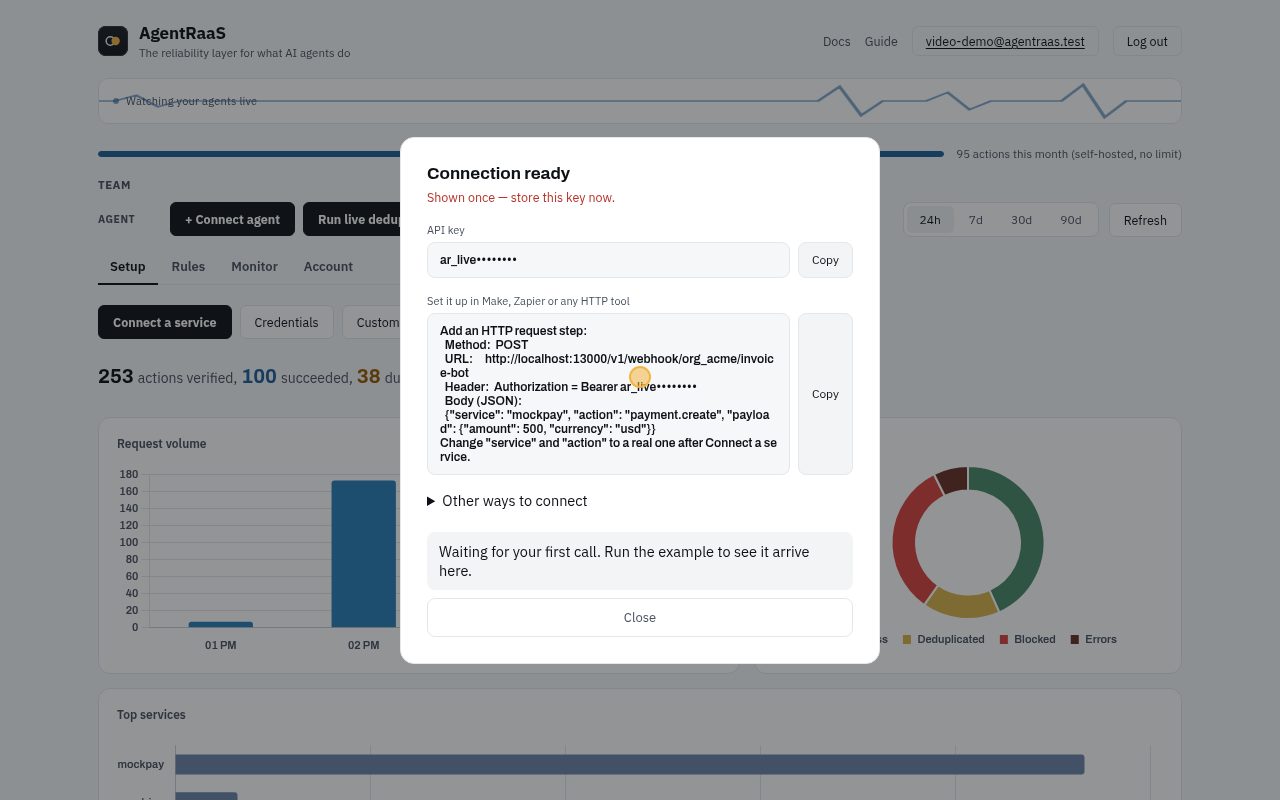
- Paste the setup text into your tool. When the agent makes its first call, it shows up here.
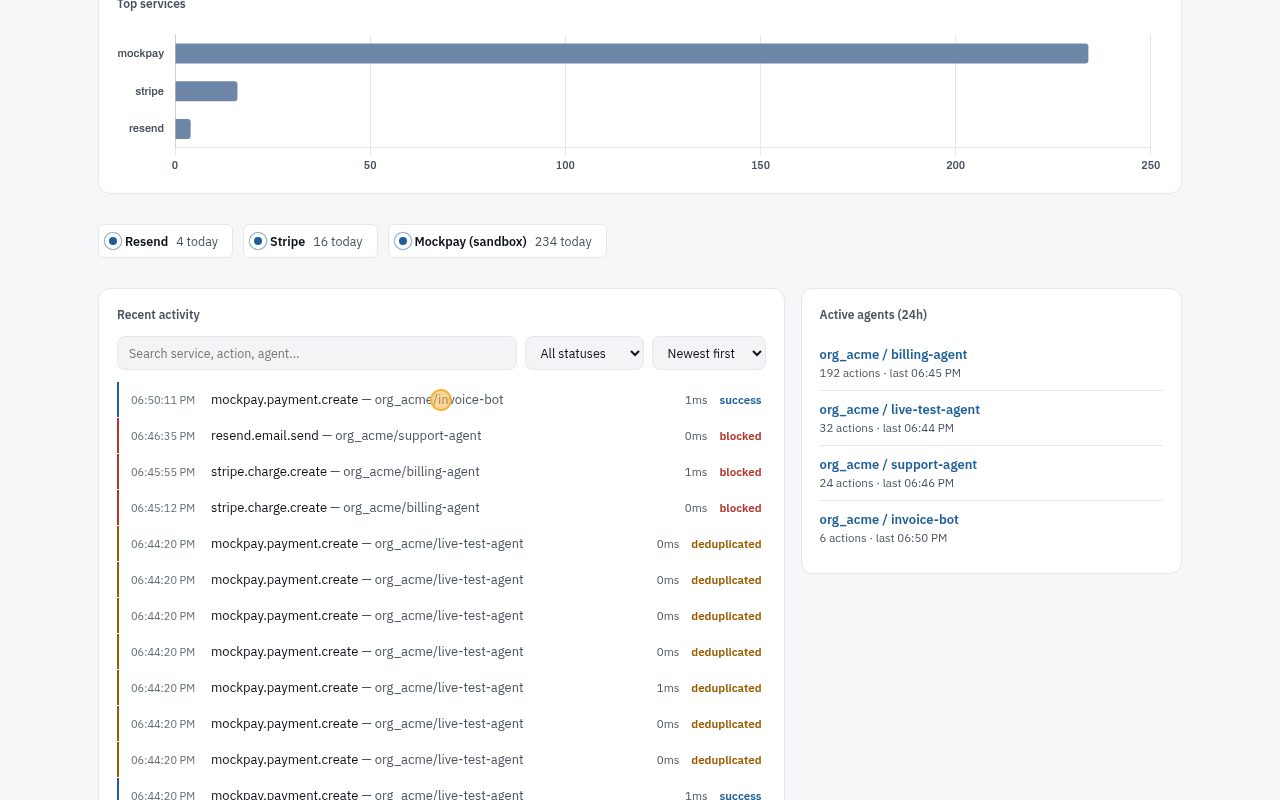
- Every call is listed under Recent activity. Click a row for its details.
With the API or in code
Or with the API (logged in as a member of the org):
POST /api/v1/agents/connect
{
  "org_id": "org_acme",
  "agent_id": "billing-agent",
  "label": "Billing agent"
}
It returns the agent's key and URLs:
{
  "api_key": "ar_live_...",
  "webhook_url": "$AGENTRAAS_URL/v1/webhook/org_acme/billing-agent",
  "mcp_url": "$AGENTRAAS_URL/mcp"
}
Every case
Click a case to see the request and the real response.
A normal call runs200
The key matches the agent, so the call is checked, sent to the payment API once and recorded.
curl -X POST "$AGENTRAAS_URL/v1/webhook/org_acme/billing-agent" \
  -H "Authorization: Bearer $AGENTRAAS_KEY" -H "Content-Type: application/json" \
  -d '{"service": "mockpay", "action": "payment.create", "payload": {"customer": "cus_101", "amount": 1500, "fail": false}}'
{
"forwarded": true,
"upstream_id": "mockpay_5ccb9571edaaa7e5",
"upstream_response": {
"id": "mockpay_5ccb9571edaaa7e5",
"amount": 1500,
"status": "completed"
},
"reqId": "req_0057c6722f9baf6a"
}A wrong key is refused401
Nothing is sent. Check the key in Connect agent, or regenerate it.
curl -X POST "$AGENTRAAS_URL/v1/webhook/org_acme/billing-agent" \
  -H "Authorization: Bearer ar_live_wrong" -H "Content-Type: application/json" \
  -d '{"service": "mockpay", "action": "payment.create", "payload": {"customer": "cus_101", "amount": 1500}}'
{
"error": "Invalid or missing API key for this agent. Generate one from the dashboard's Connect Agent panel.",
"reqId": "req_8d48b38526ebb8b3"
}A key can't act as another agent401
Each key belongs to one agent. The support agent's key is refused on the billing agent's URL.
curl -X POST "$AGENTRAAS_URL/v1/webhook/org_acme/billing-agent" \
  -H "Authorization: Bearer $SUPPORT_AGENT_KEY" -H "Content-Type: application/json" \
  -d '{"service": "mockpay", "action": "payment.create", "payload": {"customer": "cus_102", "amount": 900}}'
{
"error": "Invalid or missing API key for this agent. Generate one from the dashboard's Connect Agent panel.",
"reqId": "req_1bc28d81db487a81"
}An unknown action is refused400
Only actions the service has, or custom actions you registered, can run.
curl -X POST "$AGENTRAAS_URL/v1/webhook/org_acme/billing-agent" \
  -H "Authorization: Bearer $AGENTRAAS_KEY" -H "Content-Type: application/json" \
  -d '{"service": "mockpay", "action": "payment.teleport", "payload": {"customer": "cus_103"}}'
{
"error": "Unknown service.action: mockpay.payment.teleport",
"reqId": "req_fac48a8552f52481"
}Safe retries (exactly once)
An agent retries after a timeout, a crash or a loop. AgentRaaS recognises the same call and answers from its record, so the action runs once.
In the dashboard, step by step
No code needed. A recording of these exact clicks, then each step with a picture:
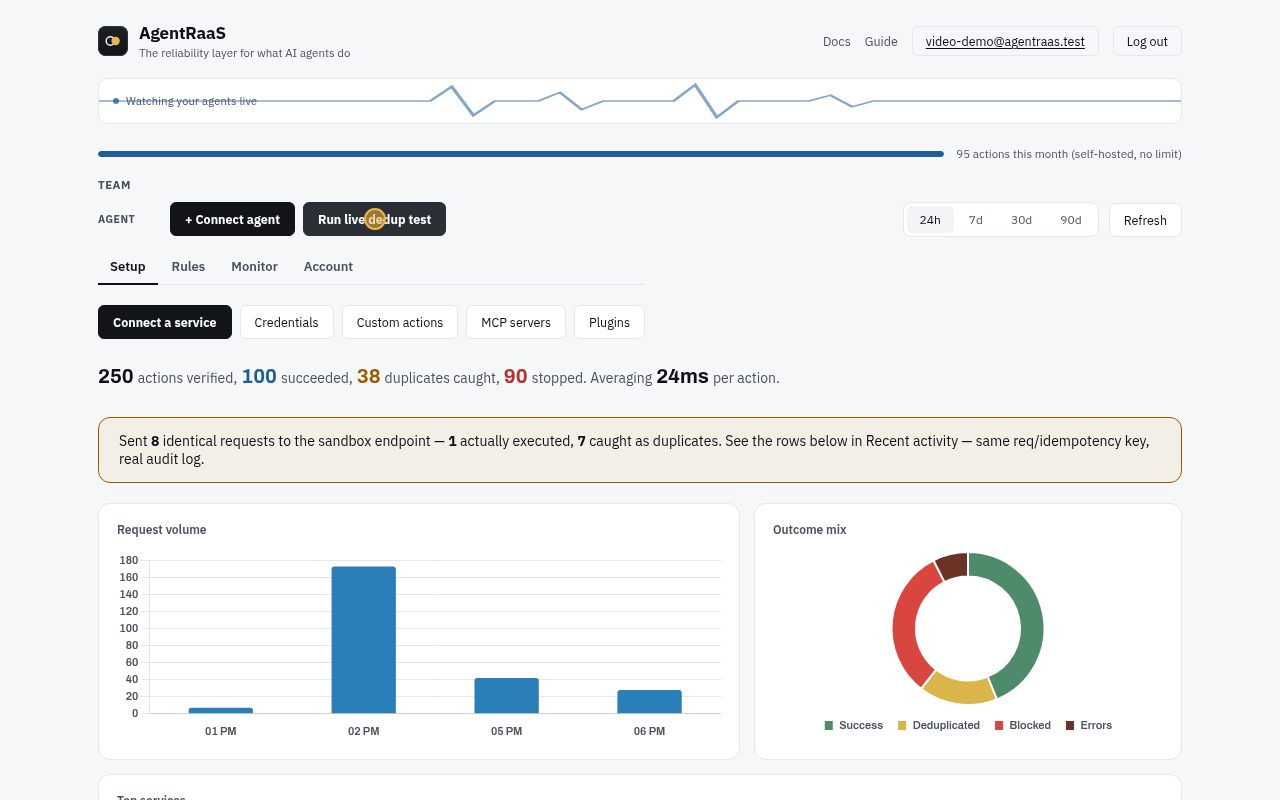
- Click Run live dedup test: 8 identical calls go to a sandbox and only 1 runs.
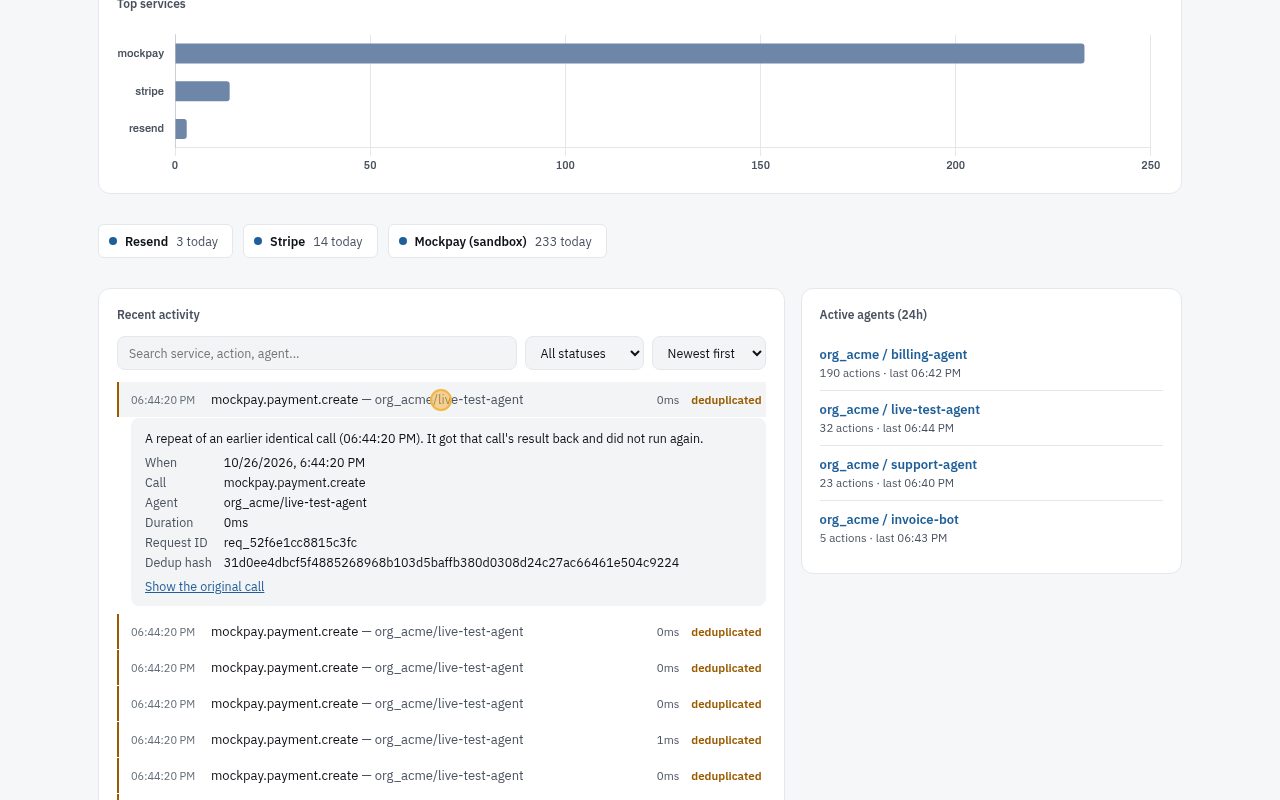
- Click a Deduplicated row to see why it was not sent again.
With the API or in code
- Same agent, same service and action, same payload = the same call
- Or send x-agentraas-idempotency-key: one key per action, never reused for a different payload
Every case
Click a case to see the request and the real response.
First call runs200
The call is new, so it runs and the result is stored.
curl -X POST "$AGENTRAAS_URL/v1/webhook/org_acme/billing-agent" \
  -H "Authorization: Bearer $AGENTRAAS_KEY" -H "Content-Type: application/json" \
  -d '{"service": "mockpay", "action": "payment.create", "payload": {"customer": "cus_201", "amount": 2500, "fail": false}}'
{
"forwarded": true,
"upstream_id": "mockpay_ca2bcc5e68218dc6",
"upstream_response": {
"id": "mockpay_ca2bcc5e68218dc6",
"amount": 2500,
"status": "completed"
},
"reqId": "req_bcb0cf24471610e6"
}The retry is answered from the record200
"cached": true and the same payment id: the payment API was not called again.
curl -X POST "$AGENTRAAS_URL/v1/webhook/org_acme/billing-agent" \
  -H "Authorization: Bearer $AGENTRAAS_KEY" -H "Content-Type: application/json" \
  -d '{"service": "mockpay", "action": "payment.create", "payload": {"customer": "cus_201", "amount": 2500, "fail": false}}'
{
"forwarded": true,
"upstream_id": "mockpay_ca2bcc5e68218dc6",
"upstream_response": {
"id": "mockpay_ca2bcc5e68218dc6",
"amount": 2500,
"status": "completed"
},
"cached": true,
"reqId": "req_48dab712c37896f2"
}A different payload is a new call200
Another amount is another action, so it runs.
curl -X POST "$AGENTRAAS_URL/v1/webhook/org_acme/billing-agent" \
  -H "Authorization: Bearer $AGENTRAAS_KEY" -H "Content-Type: application/json" \
  -d '{"service": "mockpay", "action": "payment.create", "payload": {"customer": "cus_201", "amount": 3000, "fail": false}}'
{
"forwarded": true,
"upstream_id": "mockpay_18687154eba8aa7d",
"upstream_response": {
"id": "mockpay_18687154eba8aa7d",
"amount": 3000,
"status": "completed"
},
"reqId": "req_2f8286d9bd0ed0ec"
}Your own idempotency key200
With x-agentraas-idempotency-key you name the action yourself, for example by your order id.
curl -X POST "$AGENTRAAS_URL/v1/webhook/org_acme/billing-agent" \
  -H "Authorization: Bearer $AGENTRAAS_KEY" -H "Content-Type: application/json" \
  -H "x-agentraas-idempotency-key: order-5531" \
  -d '{"service": "mockpay", "action": "payment.create", "payload": {"customer": "cus_202", "amount": 700, "fail": false}}'
{
"forwarded": true,
"upstream_id": "mockpay_fbae3ca493558359",
"upstream_response": {
"id": "mockpay_fbae3ca493558359",
"amount": 700,
"status": "completed"
},
"reqId": "req_c4888769c1b4f441"
}Same key, same body: answered from the record200
The retry carries the same key, so it is the same action.
curl -X POST "$AGENTRAAS_URL/v1/webhook/org_acme/billing-agent" \
  -H "Authorization: Bearer $AGENTRAAS_KEY" -H "Content-Type: application/json" \
  -H "x-agentraas-idempotency-key: order-5531" \
  -d '{"service": "mockpay", "action": "payment.create", "payload": {"customer": "cus_202", "amount": 700, "fail": false}}'
{
"forwarded": true,
"upstream_id": "mockpay_fbae3ca493558359",
"upstream_response": {
"id": "mockpay_fbae3ca493558359",
"amount": 700,
"status": "completed"
},
"cached": true,
"reqId": "req_8d7b9a38c31b9db6"
}Same key, different body: refused422
A key stands for one exact action. Reusing it for something else is a bug in the caller, so it gets 422 and nothing runs.
curl -X POST "$AGENTRAAS_URL/v1/webhook/org_acme/billing-agent" \
  -H "Authorization: Bearer $AGENTRAAS_KEY" -H "Content-Type: application/json" \
  -H "x-agentraas-idempotency-key: order-5531" \
  -d '{"service": "mockpay", "action": "payment.create", "payload": {"customer": "cus_202", "amount": 9900, "fail": false}}'
{
"error": "This Idempotency-Key was already used with a different payload. Use a new key for a different request.",
"reqId": "req_2afbde93e7f10218"
}Validation rules
Check every payload before it is sent. A call that breaks a rule is refused with 422, nothing reaches the provider, and the answer tells the agent how to fix it.
In the dashboard, step by step
No code needed. A recording of these exact clicks, then each step with a picture:
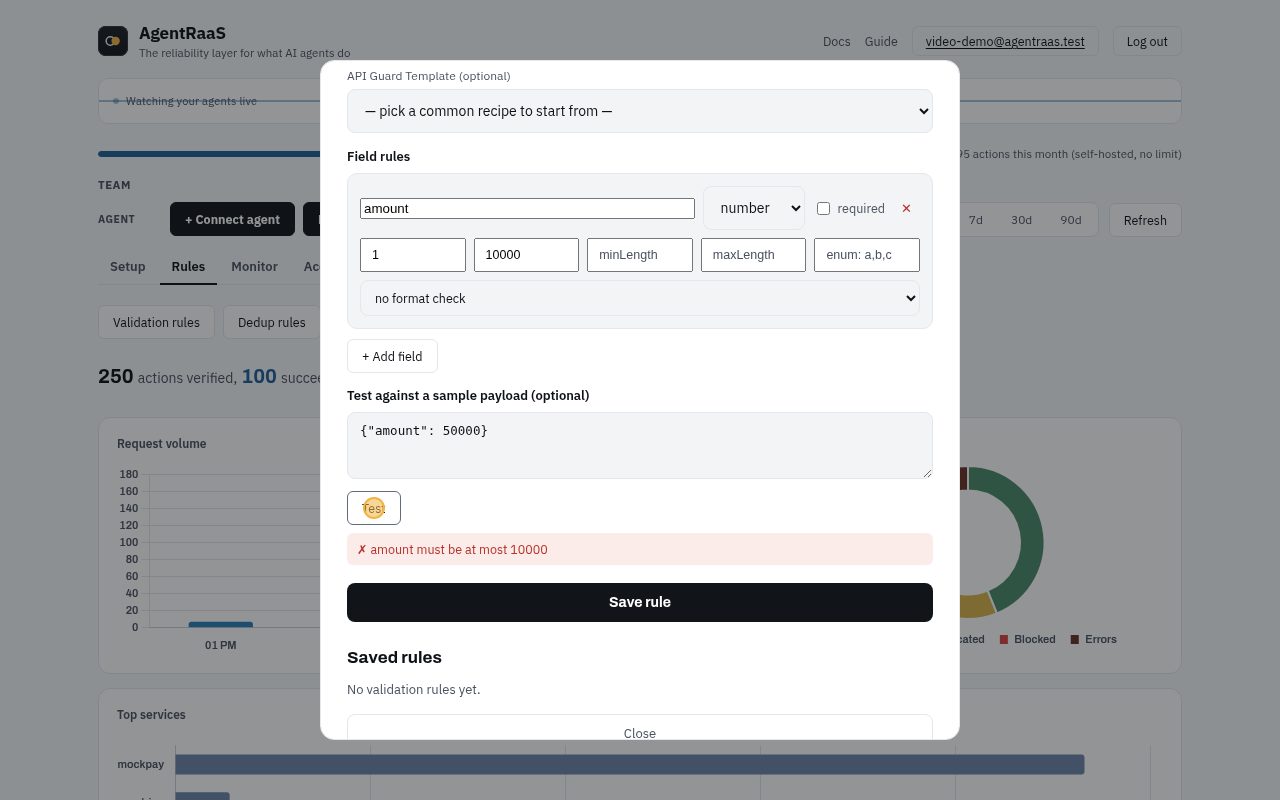
- Rules tab, Validation rules. Name the service and action (Stripe, charge.create), then add a field: amount must be a number from 1 to 10000.
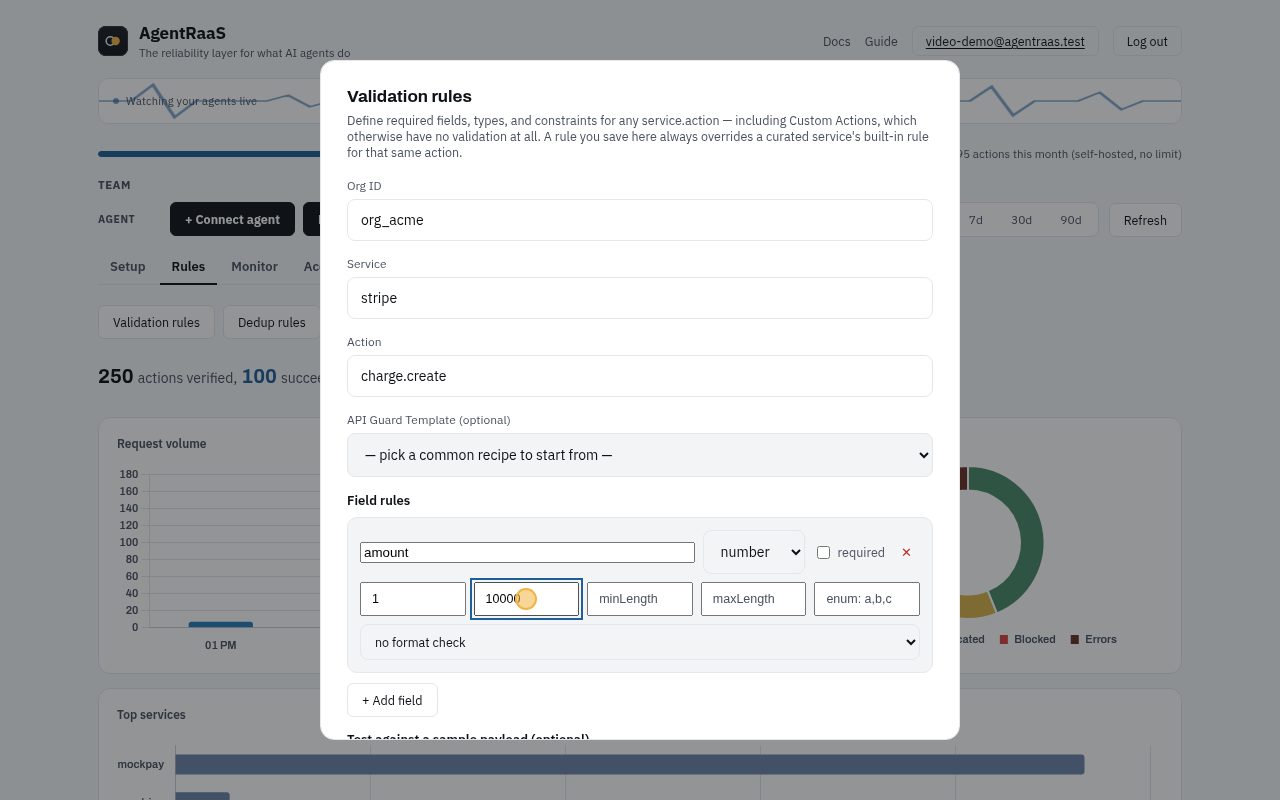
- Try it before saving: paste a sample and click Test. 50000 is too big, so it would be refused.
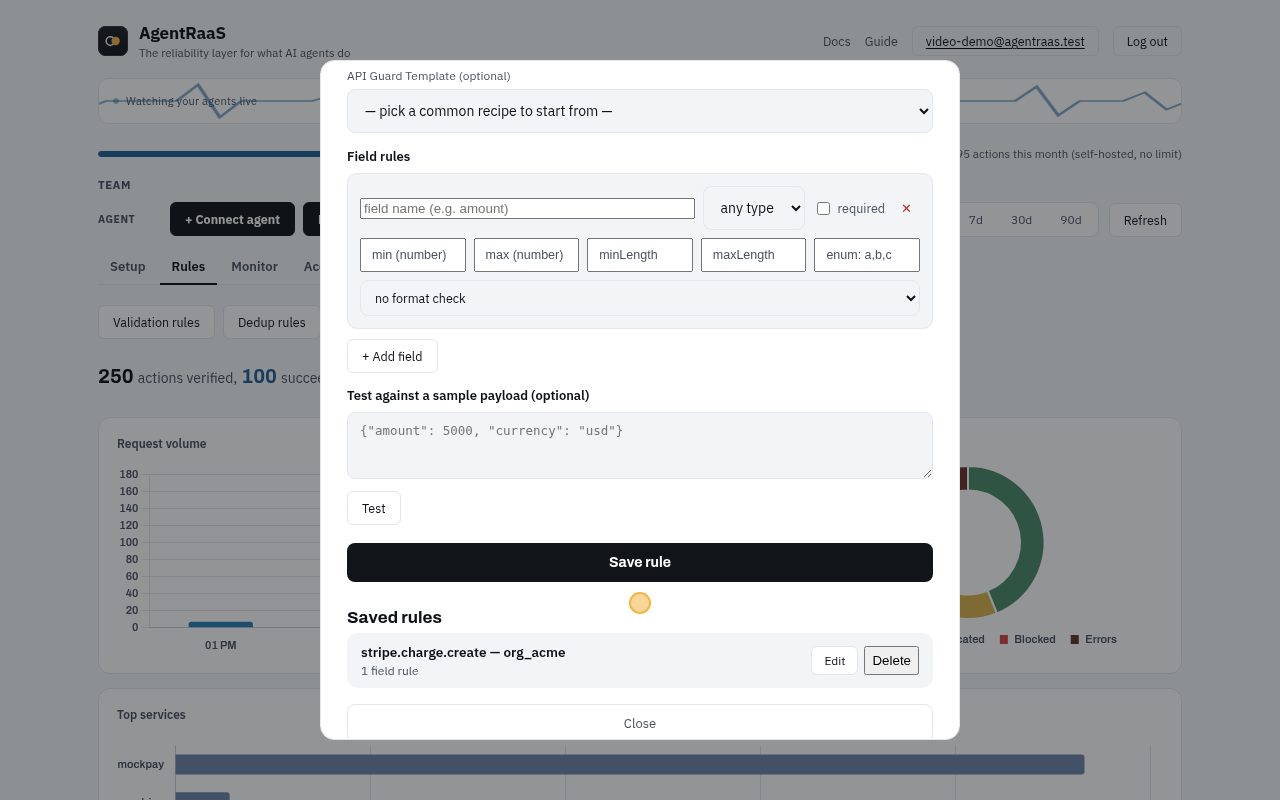
- Click Save rule. It is listed under Saved rules and applies right away.
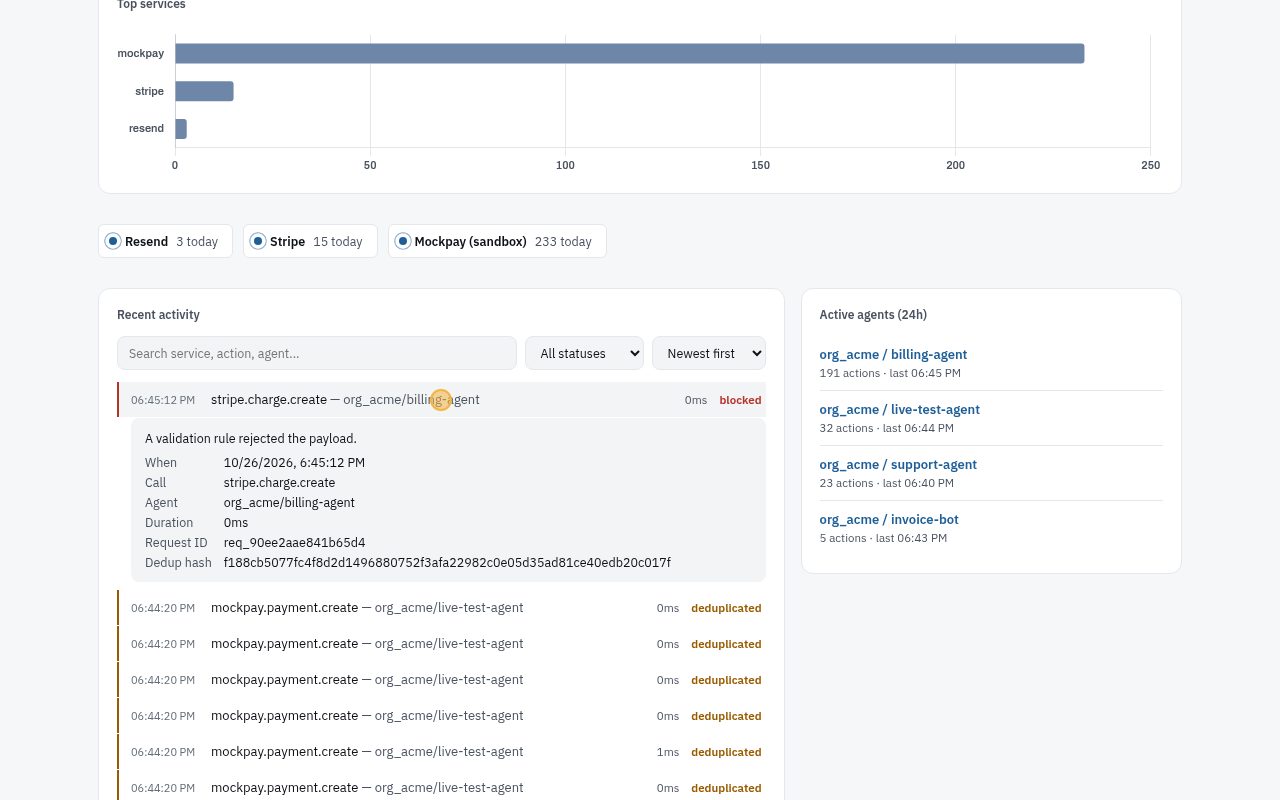
- When an agent tries to charge 50000, the call is blocked and never reaches Stripe. The row says why.
With the API or in code
Rule used below: amount: a number from 100 to 10000, never above balance.
POST /api/v1/validation-rules
{
  "org_id": "org_acme",
  "service": "mockpay",
  "action": "payment.create",
  "fields": {
    "amount": {
      "type": "number",
      "min": 100,
      "max": 10000,
      "maxField": "balance"
    }
  }
}
Every case
Click a case to see the request and the real response.
A good payload runs200
Every field passes.
curl -X POST "$AGENTRAAS_URL/v1/webhook/org_acme/billing-agent" \
  -H "Authorization: Bearer $AGENTRAAS_KEY" -H "Content-Type: application/json" \
  -d '{"service": "mockpay", "action": "payment.create", "payload": {"customer": "cus_301", "amount": 4000, "balance": 9000, "fail": false}}'
{
"forwarded": true,
"upstream_id": "mockpay_de7d3b2cafeeb257",
"upstream_response": {
"id": "mockpay_de7d3b2cafeeb257",
"amount": 4000,
"status": "completed"
},
"reqId": "req_490edabf61d390e6"
}Too big422
Above max: refused, nothing sent.
curl -X POST "$AGENTRAAS_URL/v1/webhook/org_acme/billing-agent" \
  -H "Authorization: Bearer $AGENTRAAS_KEY" -H "Content-Type: application/json" \
  -d '{"service": "mockpay", "action": "payment.create", "payload": {"customer": "cus_302", "amount": 50000, "balance": 90000}}'
{
"error": "amount must be at most 10000",
"reqId": "req_b77b85156f18c45c",
"validation_errors": [
{
"field": "amount",
"rule": "max",
"message": "amount must be at most 10000",
"hint": "Use a value of 10000 or less for \"amount\"."
}
],
"next_step": "Nothing was sent. Fix every field listed in validation_errors, following each hint, and send the call again."
}Too small422
Below min.
curl -X POST "$AGENTRAAS_URL/v1/webhook/org_acme/billing-agent" \
  -H "Authorization: Bearer $AGENTRAAS_KEY" -H "Content-Type: application/json" \
  -d '{"service": "mockpay", "action": "payment.create", "payload": {"customer": "cus_303", "amount": 5, "balance": 9000}}'
{
"error": "amount must be at least 100",
"reqId": "req_0eb6f0cad08c05b2",
"validation_errors": [
{
"field": "amount",
"rule": "min",
"message": "amount must be at least 100",
"hint": "Use a value of 100 or more for \"amount\"."
}
],
"next_step": "Nothing was sent. Fix every field listed in validation_errors, following each hint, and send the call again."
}Wrong type422
A string where a number belongs. The hint says what to send instead.
curl -X POST "$AGENTRAAS_URL/v1/webhook/org_acme/billing-agent" \
  -H "Authorization: Bearer $AGENTRAAS_KEY" -H "Content-Type: application/json" \
  -d '{"service": "mockpay", "action": "payment.create", "payload": {"customer": "cus_304", "amount": "forty", "balance": 9000}}'
{
"error": "amount must be number, got string",
"reqId": "req_b6a0703342901678",
"validation_errors": [
{
"field": "amount",
"rule": "type",
"message": "amount must be number, got string",
"hint": "Send \"amount\" as a number."
}
],
"next_step": "Nothing was sent. Fix every field listed in validation_errors, following each hint, and send the call again."
}More than the balance422
amount may not be above the payload's own balance field.
curl -X POST "$AGENTRAAS_URL/v1/webhook/org_acme/billing-agent" \
  -H "Authorization: Bearer $AGENTRAAS_KEY" -H "Content-Type: application/json" \
  -d '{"service": "mockpay", "action": "payment.create", "payload": {"customer": "cus_305", "amount": 6000, "balance": 2000}}'
{
"error": "amount (6000) must not exceed balance (2000)",
"reqId": "req_73533228ce2ec5c9",
"validation_errors": [
{
"field": "amount",
"rule": "maxField",
"message": "amount (6000) must not exceed balance (2000)",
"hint": "Lower \"amount\" to 2000 or less, the current \"balance\"."
}
],
"next_step": "Nothing was sent. Fix every field listed in validation_errors, following each hint, and send the call again."
}Human approval
Hold risky calls until a person says yes. The agent gets 202 and a status URL; the call runs once when approved, or never when denied.
In the dashboard, step by step
No code needed. A recording of these exact clicks, then each step with a picture:
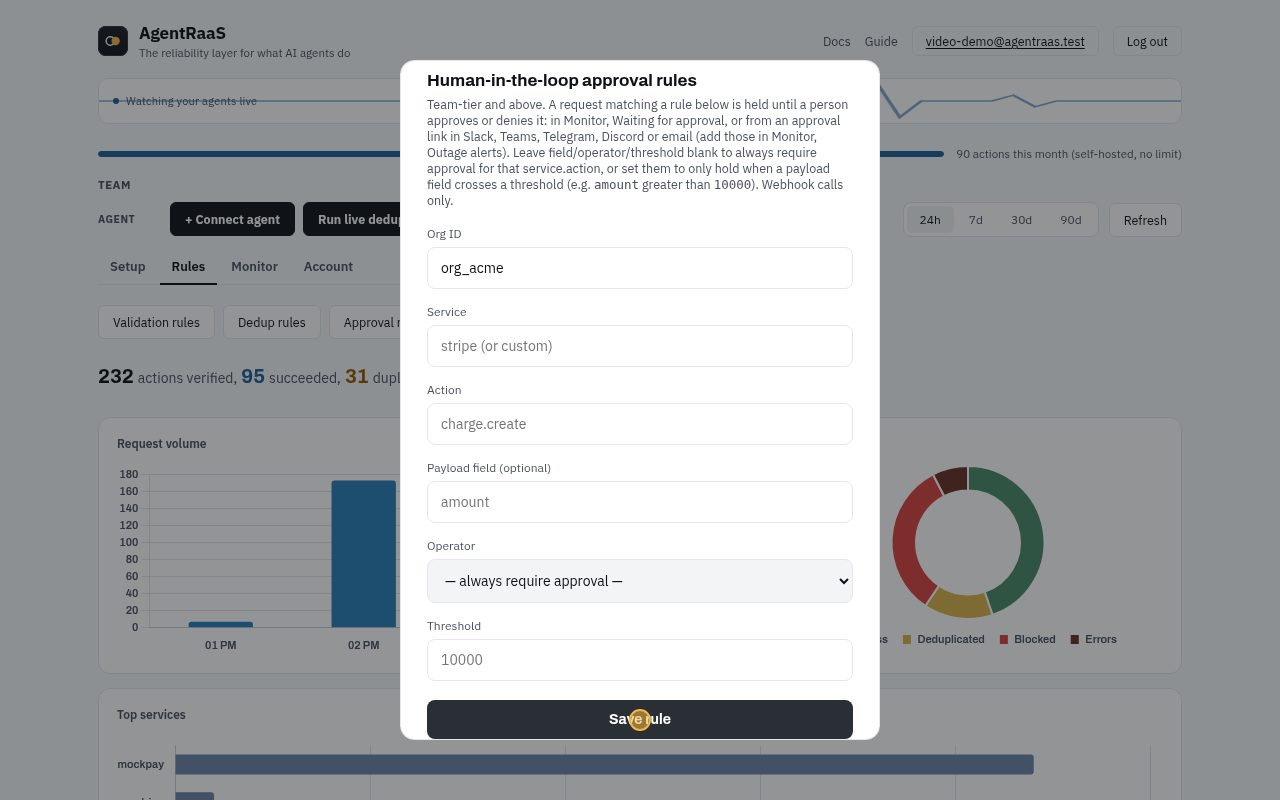
- Rules tab, Approval rules. Hold Stripe charges when the amount is greater than 5000.
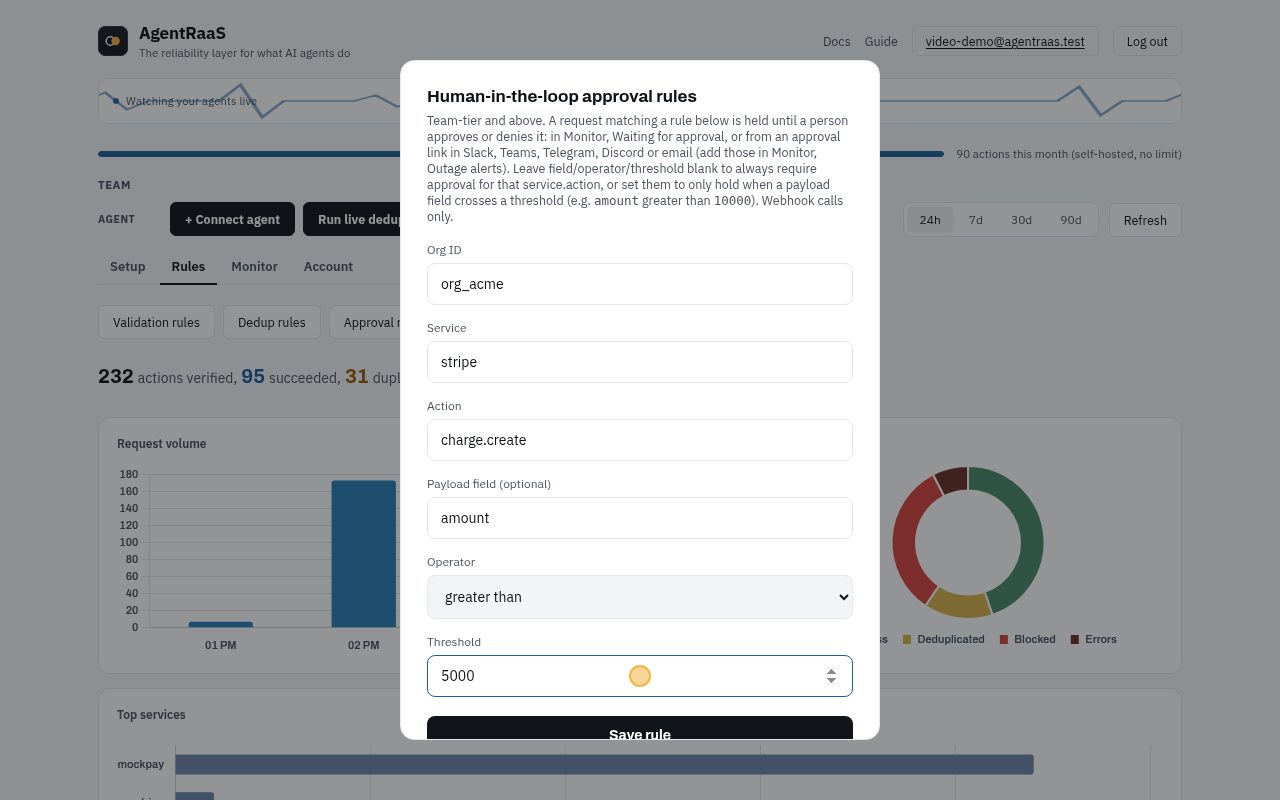
- Click Save rule.
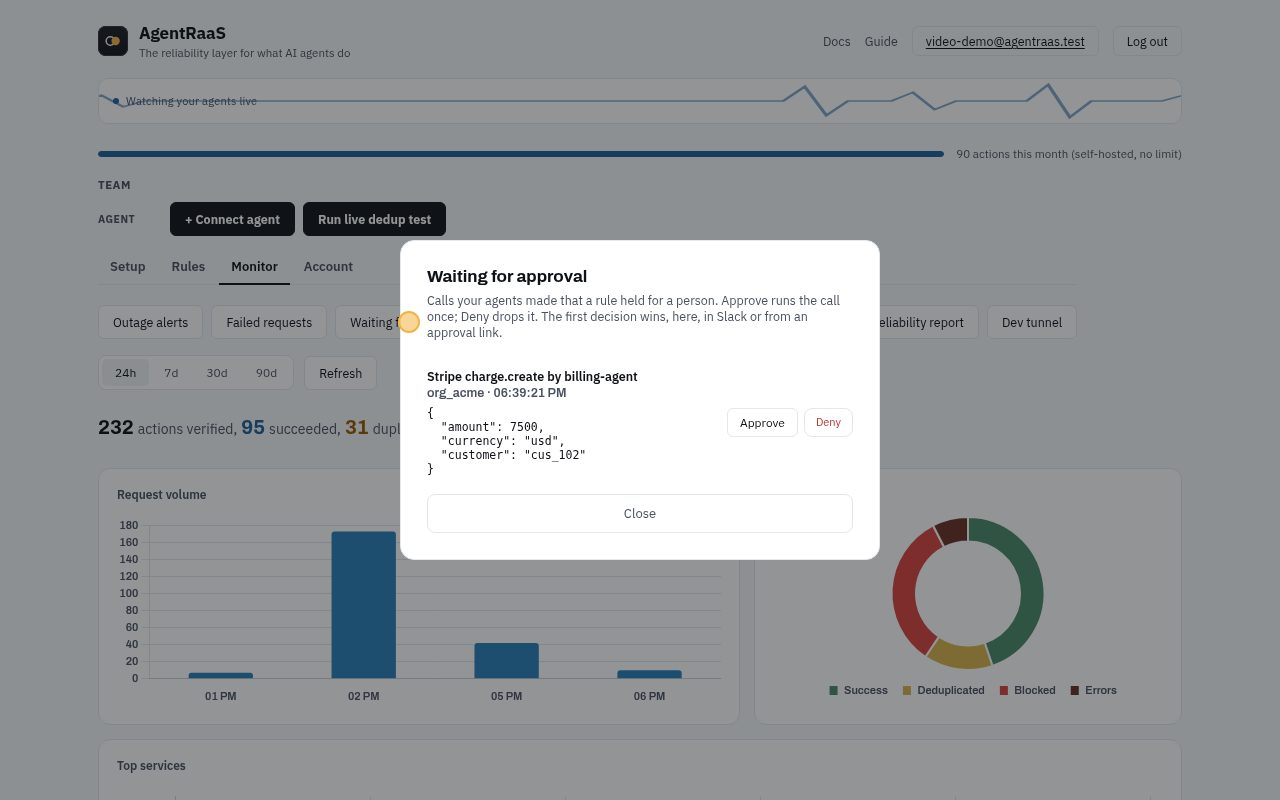
- Monitor tab, Waiting for approval: the held call, with exactly what it wants to do.
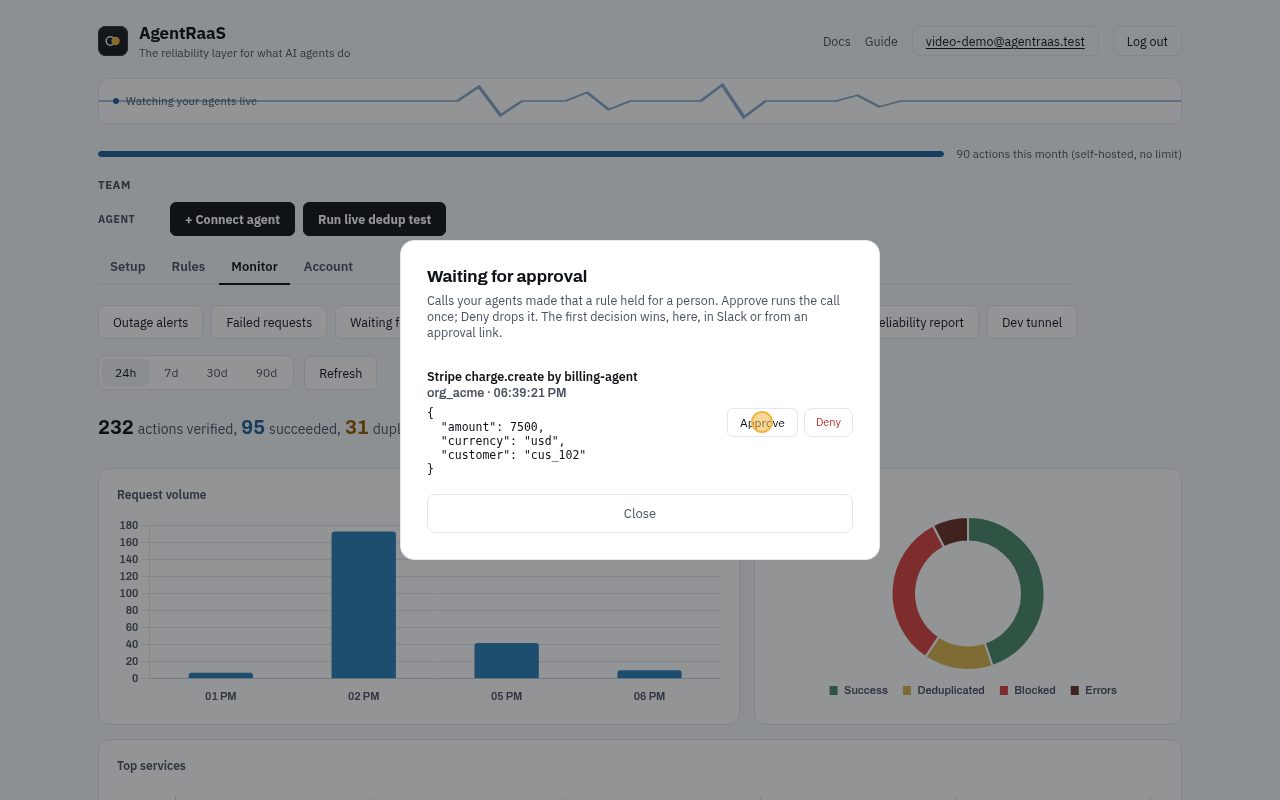
- Approve runs the call once. The first decision wins, here or from Slack, Teams, Telegram, Discord or an email link.
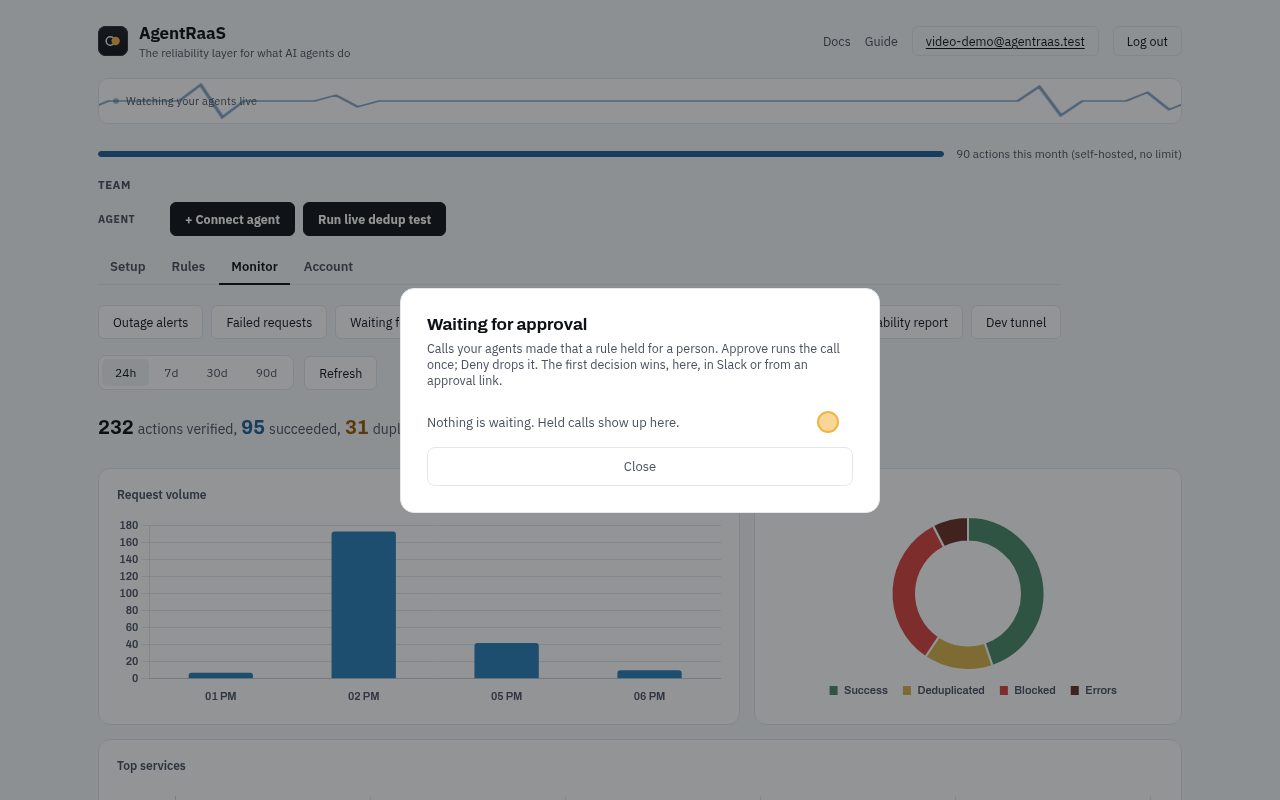
- Deny drops it: the charge never happens and the agent is told it was denied.
With the API or in code
Rule used below: hold payment.create when amount > 5000.
POST /api/v1/hitl-rules
{
  "org_id": "org_acme",
  "service": "mockpay",
  "action": "payment.create",
  "field": "amount",
  "operator": "gt",
  "threshold": 5000
}
Every case
Click a case to see the request and the real response.
Under the threshold runs at once200
amount 3000 is not above 5000, so no approval is needed.
curl -X POST "$AGENTRAAS_URL/v1/webhook/org_acme/billing-agent" \
  -H "Authorization: Bearer $AGENTRAAS_KEY" -H "Content-Type: application/json" \
  -d '{"service": "mockpay", "action": "payment.create", "payload": {"customer": "cus_401", "amount": 3000, "fail": false}}'
{
"forwarded": true,
"upstream_id": "mockpay_c67428127ced4ca8",
"upstream_response": {
"id": "mockpay_c67428127ced4ca8",
"amount": 3000,
"status": "completed"
},
"reqId": "req_ecdc84ae3d625258"
}Over the threshold is held202
The agent gets 202 and a status URL. Nothing has run yet.
curl -X POST "$AGENTRAAS_URL/v1/webhook/org_acme/billing-agent" \
  -H "Authorization: Bearer $AGENTRAAS_KEY" -H "Content-Type: application/json" \
  -d '{"service": "mockpay", "action": "payment.create", "payload": {"customer": "cus_402", "amount": 8000, "fail": false}}'
{
"pending_approval": true,
"reqId": "req_40ec2fe909bc7bb7"
}A retry while it waits is not a second request409
The same call again gets 409 until someone decides.
curl -X POST "$AGENTRAAS_URL/v1/webhook/org_acme/billing-agent" \
  -H "Authorization: Bearer $AGENTRAAS_KEY" -H "Content-Type: application/json" \
  -d '{"service": "mockpay", "action": "payment.create", "payload": {"customer": "cus_402", "amount": 8000, "fail": false}}'
{
"error": "An identical request is already being processed. Retry shortly.",
"reqId": "req_655f70425b67fcd2"
}Approve: the call runs once200
In the dashboard, Slack, an approval link, or agtrs approve. The held call runs now.
POST /api/v1/hitl/req_40ec2fe909bc7bb7/decide
{"decision": "approve"}

# or: agtrs approve req_40ec2fe909bc7bb7
{
"reqId": "req_40ec2fe909bc7bb7",
"status": "approved"
}The agent checks its status URL200
The status URL now carries the result.
GET /v1/hitl/req_40ec2fe909bc7bb7{
"reqId": "req_40ec2fe909bc7bb7",
"status": "approved",
"result": {
"forwarded": true,
"upstream_id": "mockpay_d15a4f6b6f6360fe",
"upstream_response": {
"id": "mockpay_d15a4f6b6f6360fe",
"amount": 8000,
"status": "completed"
}
},
"error": null
}Another big charge is held202
A second request over the threshold.
curl -X POST "$AGENTRAAS_URL/v1/webhook/org_acme/billing-agent" \
  -H "Authorization: Bearer $AGENTRAAS_KEY" -H "Content-Type: application/json" \
  -d '{"service": "mockpay", "action": "payment.create", "payload": {"customer": "cus_403", "amount": 9500, "fail": false}}'
{
"pending_approval": true,
"reqId": "req_dece4fb358d5c279"
}Deny: it never runs200
The call is dropped. Nothing reaches the payment API.
POST /api/v1/hitl/req_dece4fb358d5c279/decide
{"decision": "deny"}

# or: agtrs deny req_dece4fb358d5c279
{
"reqId": "req_dece4fb358d5c279",
"status": "denied"
}The status URL says denied200
The agent can stop or ask for a smaller amount.
GET /v1/hitl/req_dece4fb358d5c279{
"reqId": "req_dece4fb358d5c279",
"status": "denied",
"result": null,
"error": null
}Spend caps and money caps
Limit how often an agent may act, or how much money it may move per day. Over the limit, the call is refused (429) or held for approval.
In the dashboard, step by step
No code needed. A recording of these exact clicks, then each step with a picture:
- Rules tab, Spend caps. billing-agent may charge at most 10000 in total per day on Stripe. Max calls caps the number of calls instead.
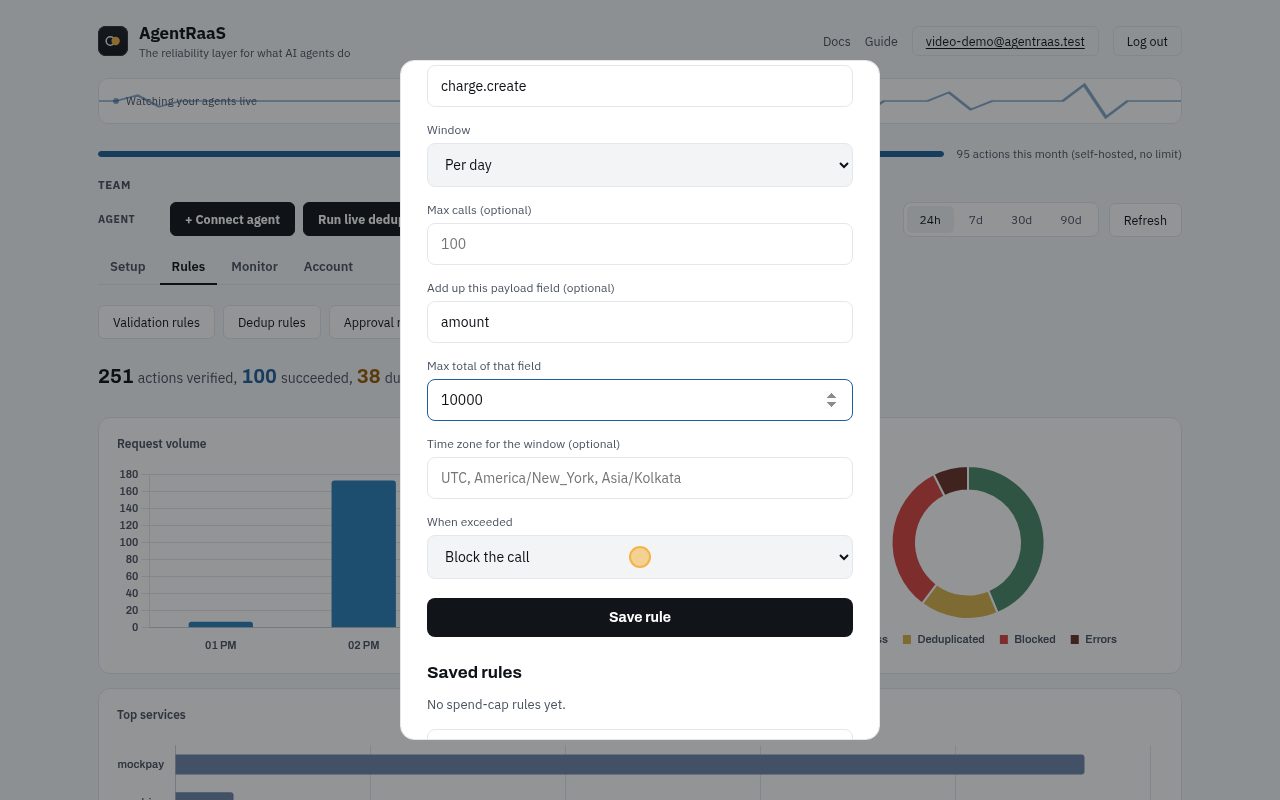
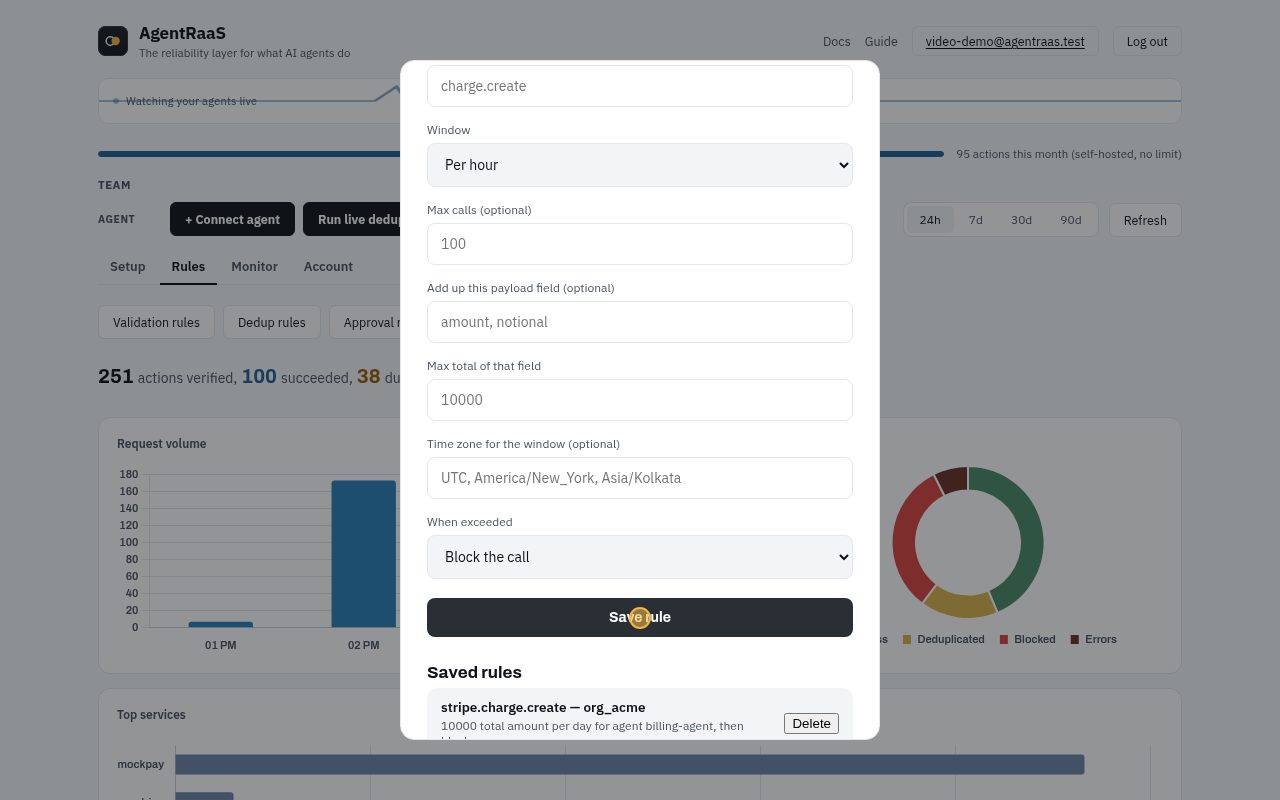
- Click Save rule. Leave Agent ID empty to cap every agent. "Route to approval" holds the call for a person instead of blocking it.
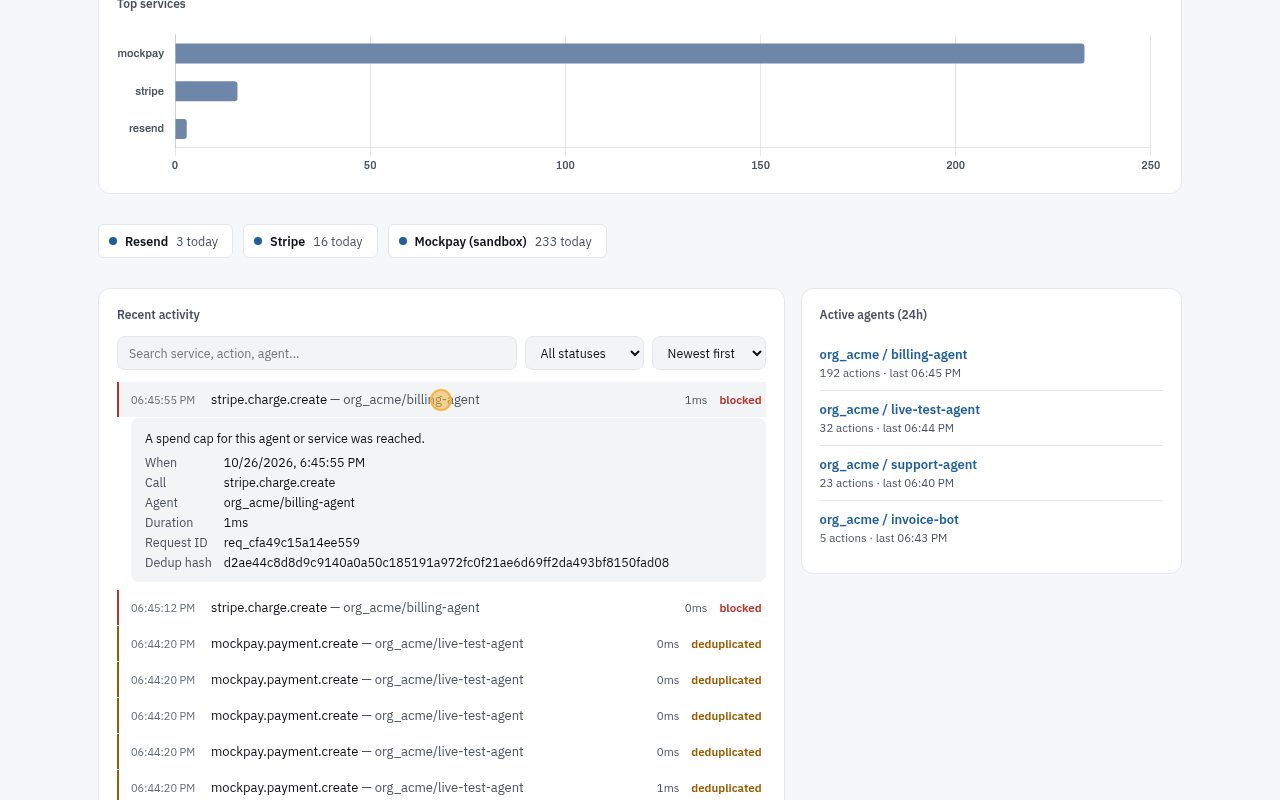
- The agent tries to charge 12000 today: over the daily total, so it is blocked before Stripe. The row says which cap stopped it.
With the API or in code
Rule used below: billing-agent: at most 2 payments an hour.
POST /api/v1/spend-cap-rules
{
  "org_id": "org_acme",
  "agent_id": "billing-agent",
  "service": "mockpay",
  "action": "payment.create",
  "window": "hour",
  "max_calls": 2,
  "on_exceed": "block"
}
Rule used below: all agents: at most 10000 in amount per day (Asia/Kolkata).
POST /api/v1/spend-cap-rules
{
  "org_id": "org_acme",
  "service": "mockpay",
  "action": "payment.create",
  "window": "day",
  "amount_field": "amount",
  "max_amount": 10000,
  "timezone": "Asia/Kolkata",
  "on_exceed": "block"
}
Rule used below: support-agent: 1 payment an hour, then ask a person.
POST /api/v1/spend-cap-rules
{
  "org_id": "org_acme",
  "agent_id": "support-agent",
  "service": "mockpay",
  "action": "payment.create",
  "window": "hour",
  "max_calls": 1,
  "on_exceed": "hitl"
}
Every case
Click a case to see the request and the real response.
Call 1 of 2 runs200
Inside the limit.
curl -X POST "$AGENTRAAS_URL/v1/webhook/org_acme/billing-agent" \
  -H "Authorization: Bearer $AGENTRAAS_KEY" -H "Content-Type: application/json" \
  -d '{"service": "mockpay", "action": "payment.create", "payload": {"customer": "cus_501", "amount": 100, "fail": false}}'
{
"forwarded": true,
"upstream_id": "mockpay_7fc536af91c1663c",
"upstream_response": {
"id": "mockpay_7fc536af91c1663c",
"amount": 100,
"status": "completed"
},
"reqId": "req_04b512c10c503762"
}Call 2 of 2 runs200
Still inside.
curl -X POST "$AGENTRAAS_URL/v1/webhook/org_acme/billing-agent" \
  -H "Authorization: Bearer $AGENTRAAS_KEY" -H "Content-Type: application/json" \
  -d '{"service": "mockpay", "action": "payment.create", "payload": {"customer": "cus_502", "amount": 100, "fail": false}}'
{
"forwarded": true,
"upstream_id": "mockpay_ca8ad07069809af5",
"upstream_response": {
"id": "mockpay_ca8ad07069809af5",
"amount": 100,
"status": "completed"
},
"reqId": "req_0bc6d5a68cba1d61"
}Call 3 is refused429
The cap is reached: 429, nothing sent, until the hour rolls over.
curl -X POST "$AGENTRAAS_URL/v1/webhook/org_acme/billing-agent" \
  -H "Authorization: Bearer $AGENTRAAS_KEY" -H "Content-Type: application/json" \
  -d '{"service": "mockpay", "action": "payment.create", "payload": {"customer": "cus_503", "amount": 100, "fail": false}}'
{
"error": "Spend cap exceeded for mockpay.payment.create: 3/2 calls this hour (rule #284).",
"reqId": "req_70bbf932f3911889"
}Other agents are not affected200
The cap names billing-agent, so the support agent's call runs.
curl -X POST "$AGENTRAAS_URL/v1/webhook/org_acme/support-agent" \
  -H "Authorization: Bearer $SUPPORT_AGENT_KEY" -H "Content-Type: application/json" \
  -d '{"service": "mockpay", "action": "payment.create", "payload": {"customer": "cus_504", "amount": 100, "fail": false}}'
{
"forwarded": true,
"upstream_id": "mockpay_5985aa6bbc218443",
"upstream_response": {
"id": "mockpay_5985aa6bbc218443",
"amount": 100,
"status": "completed"
},
"reqId": "req_74042e712a3d2385"
}A money cap adds up the amounts200
6000 of the 10000 for today.
curl -X POST "$AGENTRAAS_URL/v1/webhook/org_acme/billing-agent" \
  -H "Authorization: Bearer $AGENTRAAS_KEY" -H "Content-Type: application/json" \
  -d '{"service": "mockpay", "action": "payment.create", "payload": {"customer": "cus_505", "amount": 6000, "fail": false}}'
{
"forwarded": true,
"upstream_id": "mockpay_b34401f1b1c794fb",
"upstream_response": {
"id": "mockpay_b34401f1b1c794fb",
"amount": 6000,
"status": "completed"
},
"reqId": "req_de7f06b4afbcfdd5"
}Going over the daily total is refused429
6000 + 5000 would be 11000, above 10000. The refused call uses none of the budget.
curl -X POST "$AGENTRAAS_URL/v1/webhook/org_acme/billing-agent" \
  -H "Authorization: Bearer $AGENTRAAS_KEY" -H "Content-Type: application/json" \
  -d '{"service": "mockpay", "action": "payment.create", "payload": {"customer": "cus_506", "amount": 5000, "fail": false}}'
{
"error": "Spend cap exceeded for mockpay.payment.create: amount 5000 would bring this day's total to 11000, above 10000 (rule #285).",
"reqId": "req_8079e0032ae6103e"
}A smaller amount still fits200
6000 + 3000 = 9000.
curl -X POST "$AGENTRAAS_URL/v1/webhook/org_acme/billing-agent" \
  -H "Authorization: Bearer $AGENTRAAS_KEY" -H "Content-Type: application/json" \
  -d '{"service": "mockpay", "action": "payment.create", "payload": {"customer": "cus_507", "amount": 3000, "fail": false}}'
{
"forwarded": true,
"upstream_id": "mockpay_cfbe6cd8ae2a063a",
"upstream_response": {
"id": "mockpay_cfbe6cd8ae2a063a",
"amount": 3000,
"status": "completed"
},
"reqId": "req_0c21892d04e5d238"
}Inside the cap runs200
First payment this hour.
curl -X POST "$AGENTRAAS_URL/v1/webhook/org_acme/support-agent" \
  -H "Authorization: Bearer $SUPPORT_AGENT_KEY" -H "Content-Type: application/json" \
  -d '{"service": "mockpay", "action": "payment.create", "payload": {"customer": "cus_508", "amount": 100, "fail": false}}'
{
"forwarded": true,
"upstream_id": "mockpay_960bb281b5faaac1",
"upstream_response": {
"id": "mockpay_960bb281b5faaac1",
"amount": 100,
"status": "completed"
},
"reqId": "req_c1d92d0ad2d4a70f"
}Over the cap waits for a person202
on_exceed hitl: held for approval instead of refused.
curl -X POST "$AGENTRAAS_URL/v1/webhook/org_acme/support-agent" \
  -H "Authorization: Bearer $SUPPORT_AGENT_KEY" -H "Content-Type: application/json" \
  -d '{"service": "mockpay", "action": "payment.create", "payload": {"customer": "cus_509", "amount": 100, "fail": false}}'
{
"pending_approval": true,
"reqId": "req_ed5901ec5a024335"
}Action policies and allowed hours
Decide what each agent may do at all: deny an action, require a field to match (an email domain), or allow it only during working hours. A refused call gets 403 naming the policy.
In the dashboard, step by step
No code needed. A recording of these exact clicks, then each step with a picture:
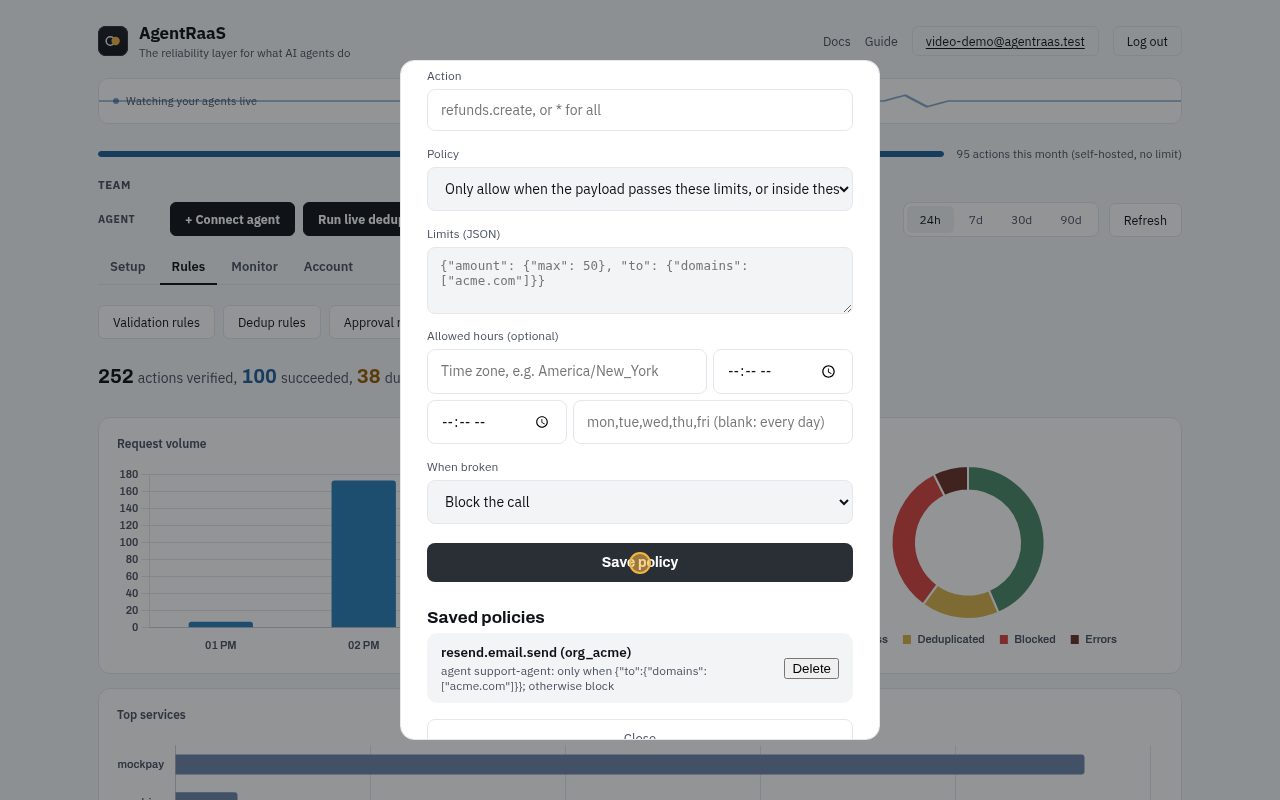
- Rules tab, Action policies. support-agent may send email (Resend) only to addresses at acme.com.
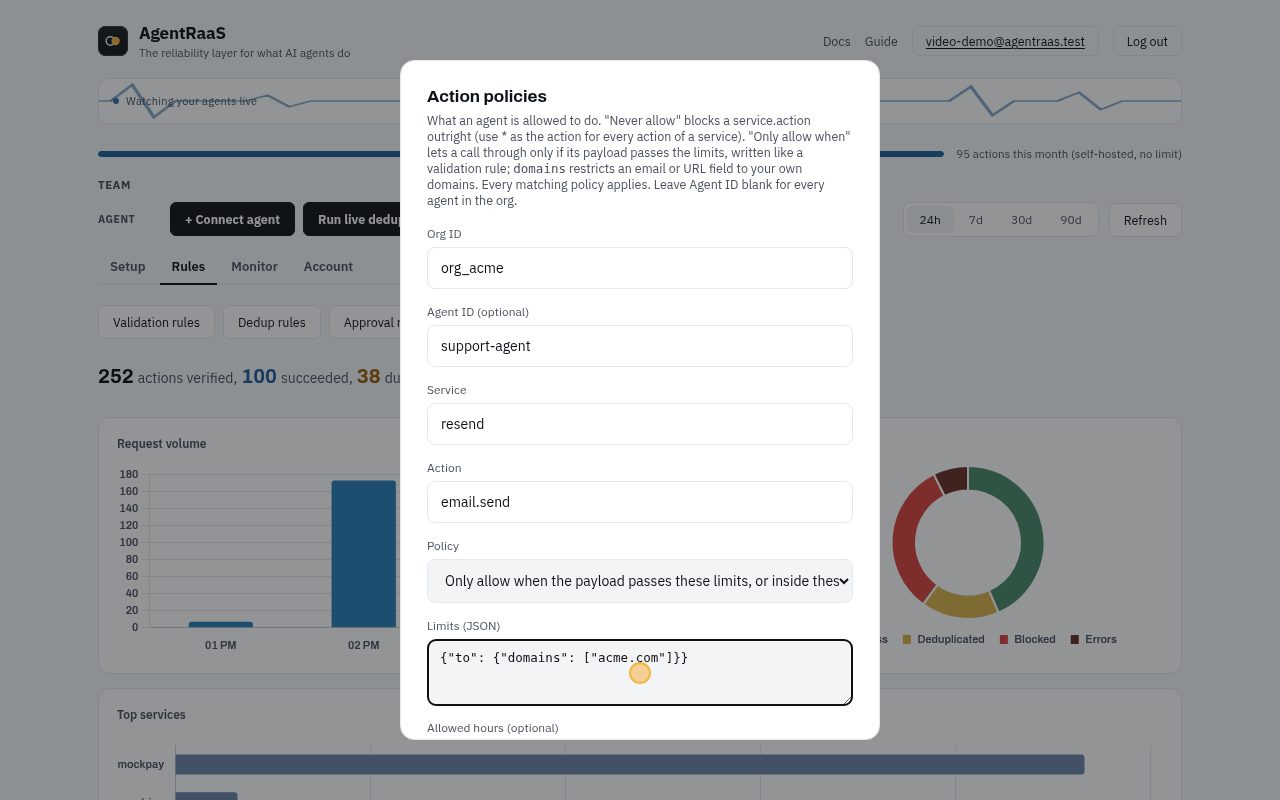
- Click Save policy. "Never allow" blocks an action outright; allowed hours limit when it may run.
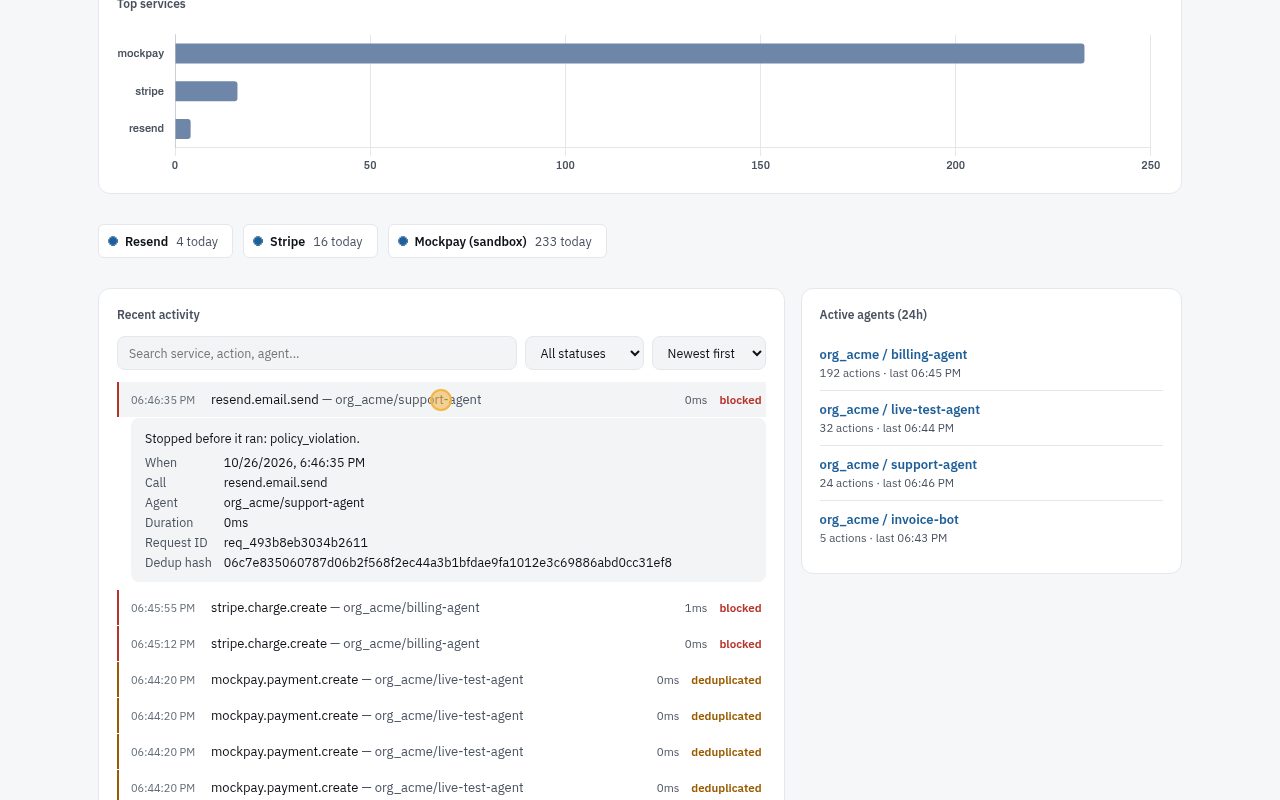
- The agent tries to email someone@gmail.com: blocked, the email is never sent. The row names the policy.
With the API or in code
Rule used below: support-agent may not use mockpay at all.
POST /api/v1/action-policies
{
  "org_id": "org_acme",
  "agent_id": "support-agent",
  "service": "mockpay",
  "action": "*",
  "effect": "deny"
}
Rule used below: receipts only go to acme.com addresses.
POST /api/v1/action-policies
{
  "org_id": "org_acme",
  "service": "mockpay",
  "action": "payment.create",
  "effect": "require",
  "fields": {
    "receipt_email": {
      "domains": [
        "acme.com"
      ]
    }
  }
}
Rule used below: refunds only on tue, wed, thu, fri, sat, sun, 09:00 to 17:00 UTC.
POST /api/v1/action-policies
{
  "org_id": "org_acme",
  "service": "mockpay",
  "action": "payment.refund",
  "effect": "require",
  "hours": {
    "tz": "UTC",
    "days": [
      "tue",
      "wed",
      "thu",
      "fri",
      "sat",
      "sun"
    ],
    "from": "09:00",
    "to": "17:00"
  }
}
Every case
Click a case to see the request and the real response.
Denied for this agent403
The support agent may not take payments. The answer names the policy.
curl -X POST "$AGENTRAAS_URL/v1/webhook/org_acme/support-agent" \
  -H "Authorization: Bearer $SUPPORT_AGENT_KEY" -H "Content-Type: application/json" \
  -d '{"service": "mockpay", "action": "payment.create", "payload": {"customer": "cus_601", "amount": 100, "receipt_email": "pat@acme.com", "fail": false}}'
{
"error": "This agent may not call mockpay.payment.create (action policy #171)",
"reqId": "req_0a6d56b005a3c592"
}Allowed for the billing agent200
The deny names only the support agent.
curl -X POST "$AGENTRAAS_URL/v1/webhook/org_acme/billing-agent" \
  -H "Authorization: Bearer $AGENTRAAS_KEY" -H "Content-Type: application/json" \
  -d '{"service": "mockpay", "action": "payment.create", "payload": {"customer": "cus_602", "amount": 100, "receipt_email": "pat@acme.com", "fail": false}}'
{
"forwarded": true,
"upstream_id": "mockpay_26846d81cc614c98",
"upstream_response": {
"id": "mockpay_26846d81cc614c98",
"amount": 100,
"status": "completed"
},
"reqId": "req_1e4e5d30d88e1995"
}A subdomain is allowed too200
billing.acme.com is inside acme.com.
curl -X POST "$AGENTRAAS_URL/v1/webhook/org_acme/billing-agent" \
  -H "Authorization: Bearer $AGENTRAAS_KEY" -H "Content-Type: application/json" \
  -d '{"service": "mockpay", "action": "payment.create", "payload": {"customer": "cus_603", "amount": 100, "receipt_email": "pat@billing.acme.com", "fail": false}}'
{
"forwarded": true,
"upstream_id": "mockpay_da7d5972c4ce1daf",
"upstream_response": {
"id": "mockpay_da7d5972c4ce1daf",
"amount": 100,
"status": "completed"
},
"reqId": "req_091edb3571207bad"
}A look-alike domain is refused403
acme.com.evil.io is not acme.com: a prompt-injected address is stopped.
curl -X POST "$AGENTRAAS_URL/v1/webhook/org_acme/billing-agent" \
  -H "Authorization: Bearer $AGENTRAAS_KEY" -H "Content-Type: application/json" \
  -d '{"service": "mockpay", "action": "payment.create", "payload": {"customer": "cus_604", "amount": 100, "receipt_email": "pat@acme.com.evil.io", "fail": false}}'
{
"error": "receipt_email (pat@acme.com.evil.io) is not in an allowed domain: acme.com (action policy #172)",
"reqId": "req_3a1aecfc4e462ad2"
}Outside the allowed hours403
Refunds are not allowed today, so the call is refused with the hours it is allowed in.
curl -X POST "$AGENTRAAS_URL/v1/webhook/org_acme/billing-agent" \
  -H "Authorization: Bearer $AGENTRAAS_KEY" -H "Content-Type: application/json" \
  -d '{"service": "mockpay", "action": "payment.refund", "payload": {"payment": "mockpay_x1", "fail": false}}'
{
"error": "mockpay.payment.refund is only allowed on tue, wed, thu, fri, sat, sun from 09:00 to 17:00 (UTC) (action policy #173)",
"reqId": "req_92cd00aa6d5b0780"
}Failures and the dead-letter queue
When the provider fails, the agent gets the error and the call is kept in the dead-letter queue, with its payload, to replay later. Nothing is silently lost.
In the dashboard, step by step
No code needed. A recording of these exact clicks, then each step with a picture:
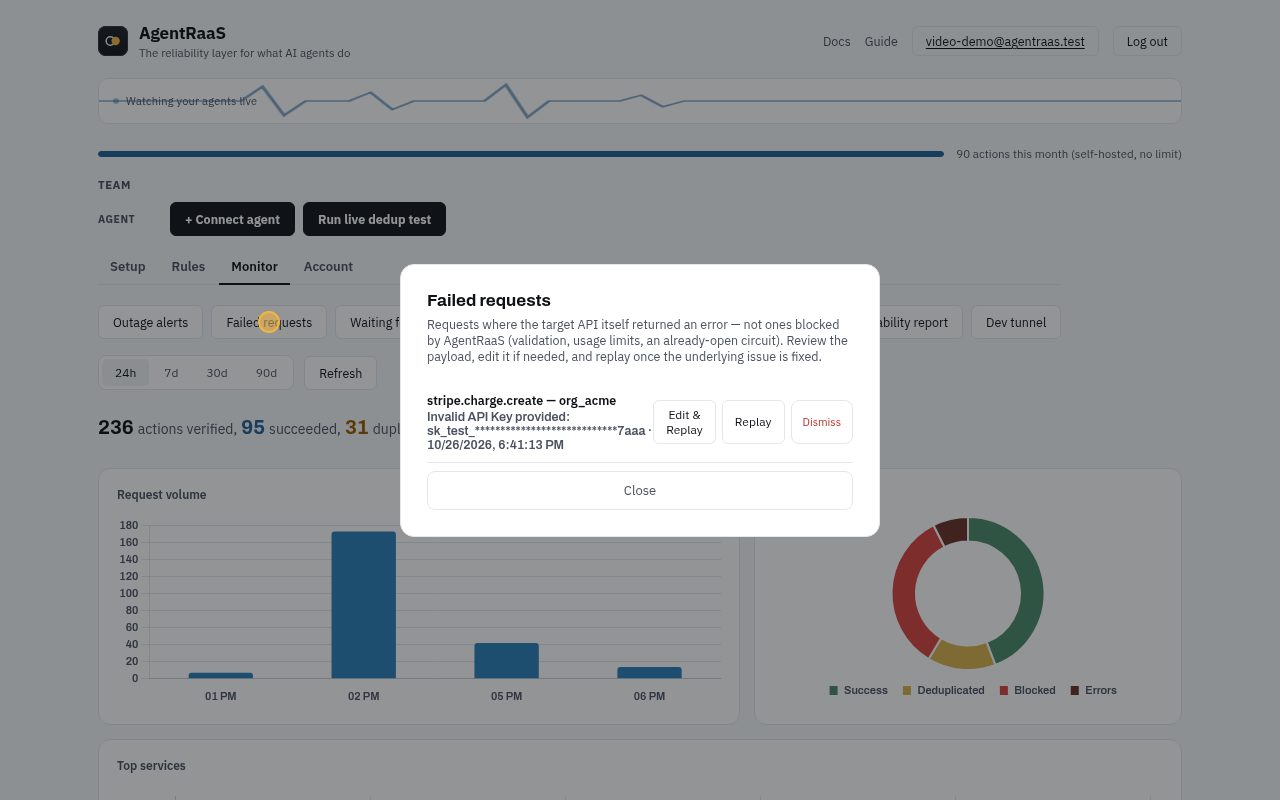
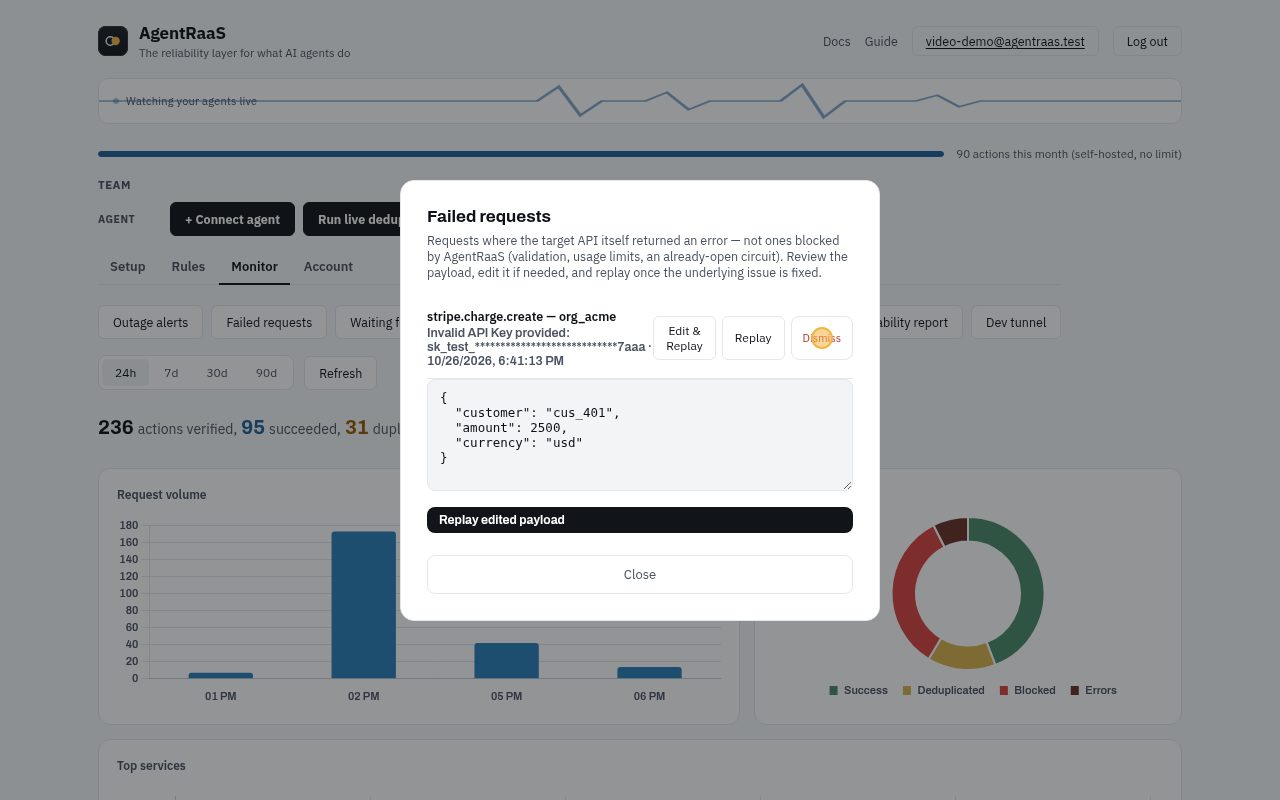
- Monitor tab, Failed requests: every call the service itself refused, with its error (here Stripe: invalid API key).
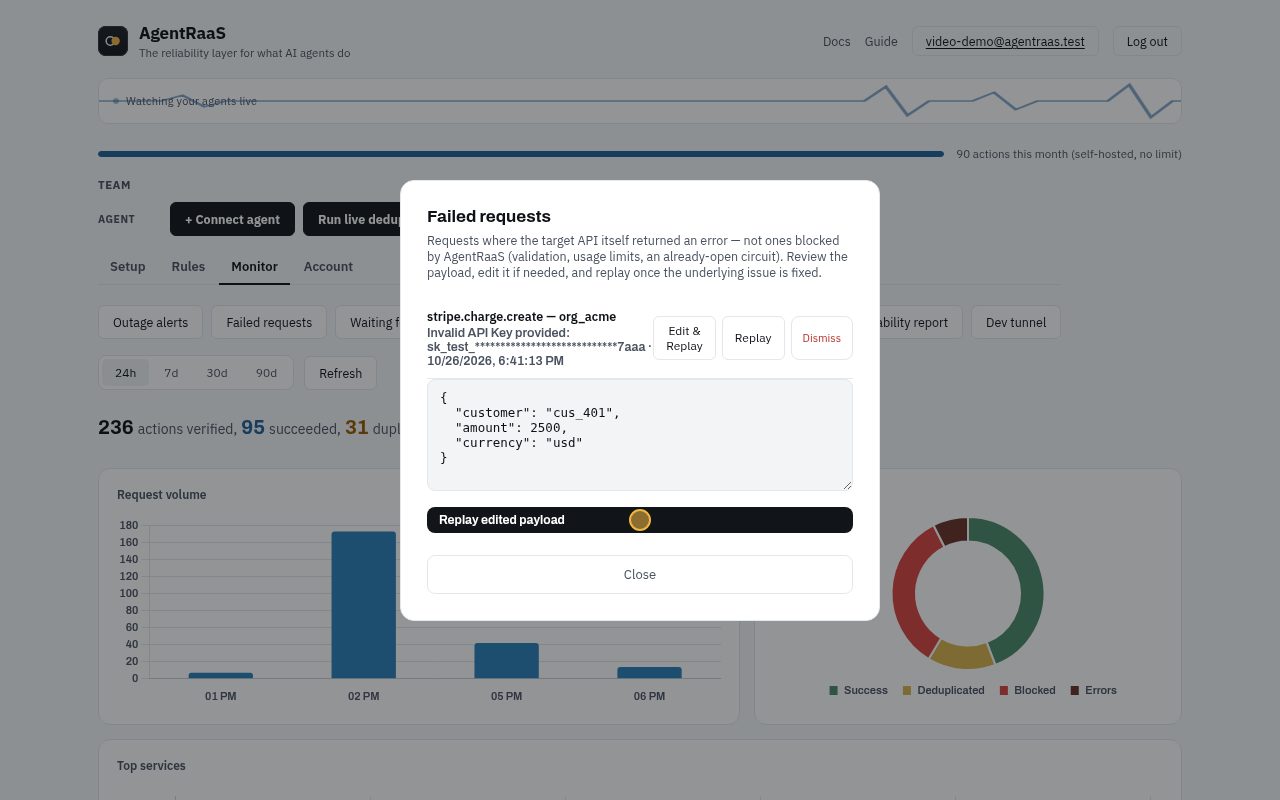
- Fix the cause first (here: paste the right key in Setup, Credentials). Then click Replay, or Edit & Replay to change the payload first.
- A replayed call that succeeds leaves the list. Dismiss removes one you do not want to send.
With the API or in code
Every case
Click a case to see the request and the real response.
The provider fails500
mockpay with fail: true always errors (it stands in for a provider outage). The agent gets the error.
curl -X POST "$AGENTRAAS_URL/v1/webhook/org_acme/billing-agent" \
  -H "Authorization: Bearer $AGENTRAAS_KEY" -H "Content-Type: application/json" \
  -d '{"service": "mockpay", "action": "payment.create", "payload": {"customer": "cus_701", "amount": 1200, "fail": true}}'
{
"error": "MockPay temporarily unavailable",
"reqId": "req_b285aba574f7e48b",
"agentraas_note": "Request blocked by AgentRaaS."
}It is in the dead-letter queue200
Monitor › Failed requests, or the API, lists it with the error.
GET /api/v1/dead-letter-queue?org_id=org_acme{
"entries": [
{
"id": 417,
"req_id": "req_b285aba574f7e48b",
"org_id": "org_acme",
"agent_id": "billing-agent",
"service": "mockpay",
"action": "payment.create",
"error_message": "MockPay temporarily unavailable",
"created_at": "2026-10-26T09:14:11.784907Z",
"payload": {
"customer": "cus_701",
"amount": 1200,
"fail": true
}
}
]
}Replay it500
Sent again with the same Idempotency-Key, so it still runs at most once. This payload still says fail: true, so it fails again ("replayed": false); once a real provider is back, the replay runs it.
POST /api/v1/dead-letter-queue/417/replay{
"error": "MockPay temporarily unavailable",
"replayed": false,
"reqId": "req_0b1139f08b54f626"
}Repeated failures open the circuit breaker503
Calls to mockpay now get 503 at once, without being sent, so a broken provider is not hammered and the agent can back off.
curl -X POST "$AGENTRAAS_URL/v1/webhook/org_acme/billing-agent" \
  -H "Authorization: Bearer $AGENTRAAS_KEY" -H "Content-Type: application/json" \
  -d '{"service": "mockpay", "action": "payment.create", "payload": {"customer": "cus_710", "amount": 1200, "fail": false}}'
{
"error": "Circuit breaker open for mockpay. Try again later.",
"reqId": "req_a8daa75cdfbe5233"
}After 30 seconds, one call is let through200
It works, so the breaker closes and calls flow again.
curl -X POST "$AGENTRAAS_URL/v1/webhook/org_acme/billing-agent" \
  -H "Authorization: Bearer $AGENTRAAS_KEY" -H "Content-Type: application/json" \
  -d '{"service": "mockpay", "action": "payment.create", "payload": {"customer": "cus_711", "amount": 1200, "fail": false}}'
{
"forwarded": true,
"upstream_id": "mockpay_e711d951ab5b8ea9",
"upstream_response": {
"id": "mockpay_e711d951ab5b8ea9",
"amount": 1200,
"status": "completed"
},
"reqId": "req_dce3332d7b95c756"
}Back to normal200
The next call runs as usual.
curl -X POST "$AGENTRAAS_URL/v1/webhook/org_acme/billing-agent" \
  -H "Authorization: Bearer $AGENTRAAS_KEY" -H "Content-Type: application/json" \
  -d '{"service": "mockpay", "action": "payment.create", "payload": {"customer": "cus_712", "amount": 1200, "fail": false}}'
{
"forwarded": true,
"upstream_id": "mockpay_b84fafbdfff98f83",
"upstream_response": {
"id": "mockpay_b84fafbdfff98f83",
"amount": 1200,
"status": "completed"
},
"reqId": "req_e1592a116f983748"
}Undo an action
Reverse something an agent did: a charge is refunded, a Slack message deleted, your own action reversed by the action you named. Each one can be undone once, for 30 days.
In the dashboard, step by step
No code needed. A recording of these exact clicks, then each step with a picture:
- Monitor tab, Undo actions: what each one will run to reverse it (here a refund).
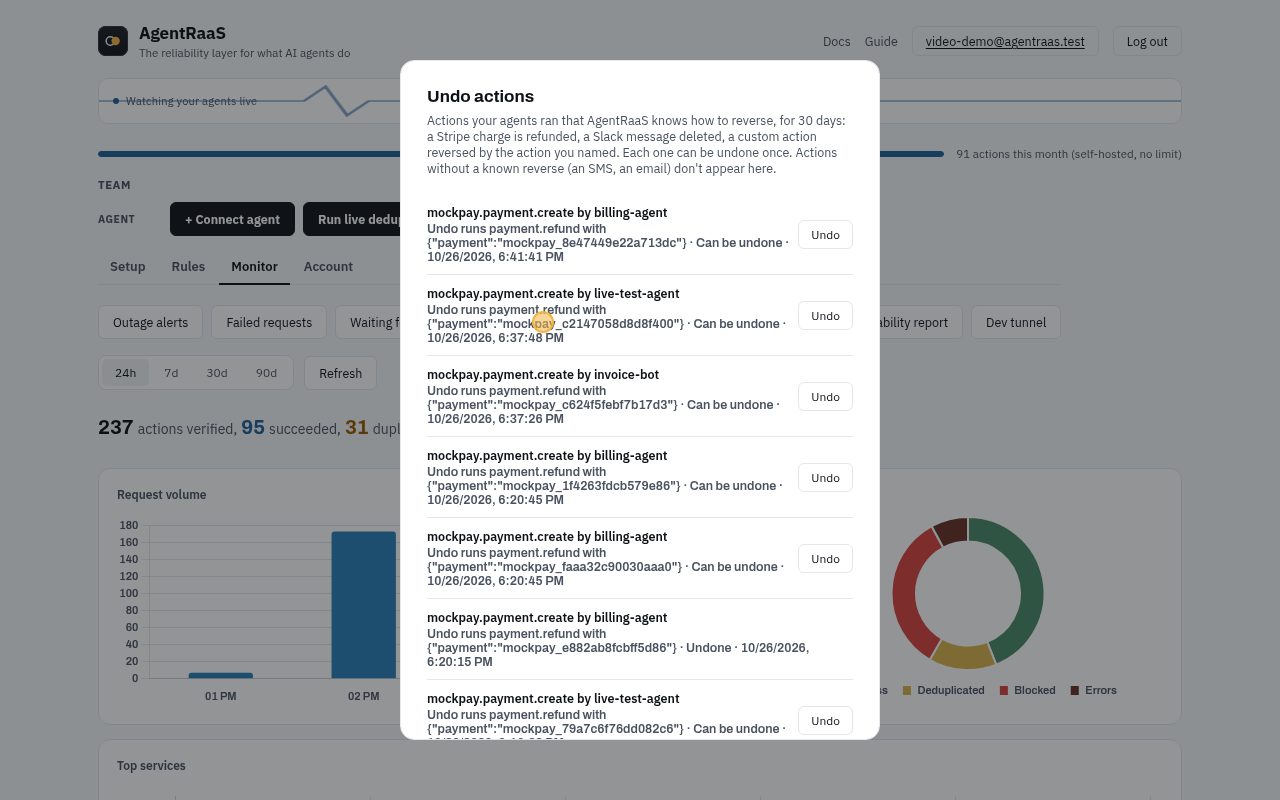
- Click Undo, then Confirm undo.
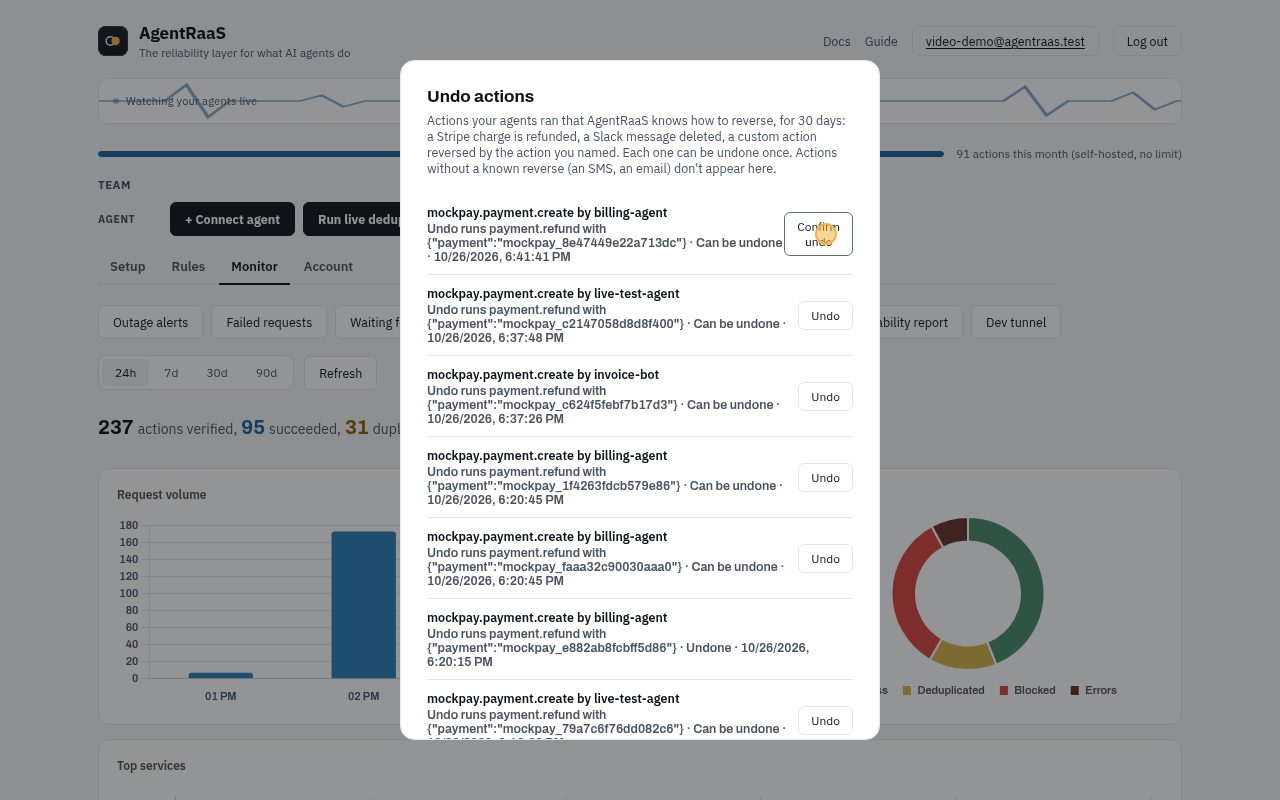
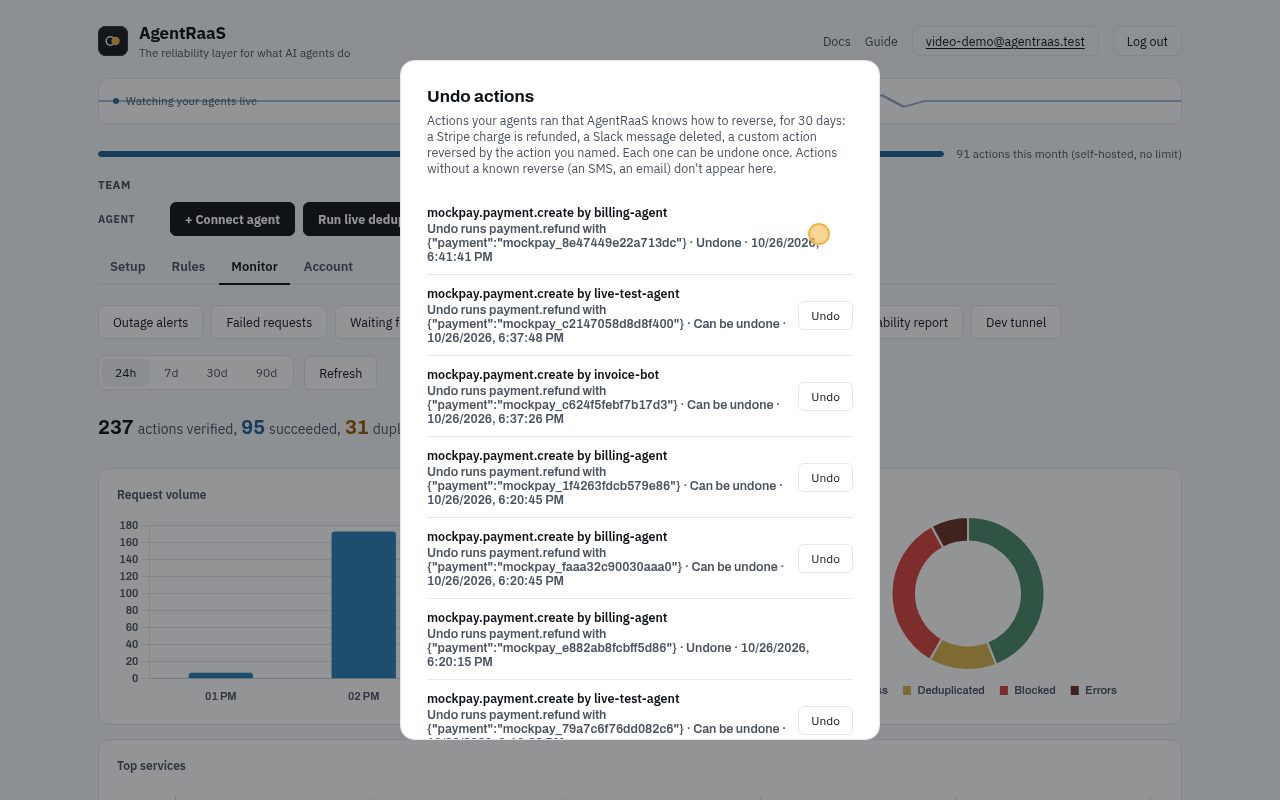
- The refund runs once. The entry is marked undone and cannot be undone twice.
With the API or in code
Every case
Click a case to see the request and the real response.
A charge runs200
It has a known reverse (payment.refund), so it is recorded as undoable.
curl -X POST "$AGENTRAAS_URL/v1/webhook/org_acme/billing-agent" \
  -H "Authorization: Bearer $AGENTRAAS_KEY" -H "Content-Type: application/json" \
  -d '{"service": "mockpay", "action": "payment.create", "payload": {"customer": "cus_801", "amount": 4500, "fail": false}}'
{
"forwarded": true,
"upstream_id": "mockpay_591cb571360f9704",
"upstream_response": {
"id": "mockpay_591cb571360f9704",
"amount": 4500,
"status": "completed"
},
"reqId": "req_a8f37613d5851054"
}It appears in Undo actions200
With what undoing it will run.
GET /api/v1/undo-log?org_id=org_acme{
"entries": [
{
"id": 2264,
"req_id": "req_a8f37613d5851054",
"undo_action": "payment.refund",
"undo_payload": {
"payment": "mockpay_591cb571360f9704"
},
"status": "available",
"expires_at": "2026-11-25T09:14:44.207621Z"
}
]
}Undo: the charge is refunded200
The reverse runs once, with its own idempotency key.
POST /api/v1/undo-log/2264/undo{
"undone": true,
"id": 2264,
"reqId": "undo_2264",
"result": {
"forwarded": true,
"upstream_id": "mockrefund_40a5349c239426ed",
"upstream_response": {
"id": "mockrefund_40a5349c239426ed",
"payment": "mockpay_591cb571360f9704",
"status": "refunded"
}
}
}A second undo is refused409
Already undone: 409, the refund never runs twice.
POST /api/v1/undo-log/2264/undo{
"error": "Can't undo: this entry is undone."
}Record and replay
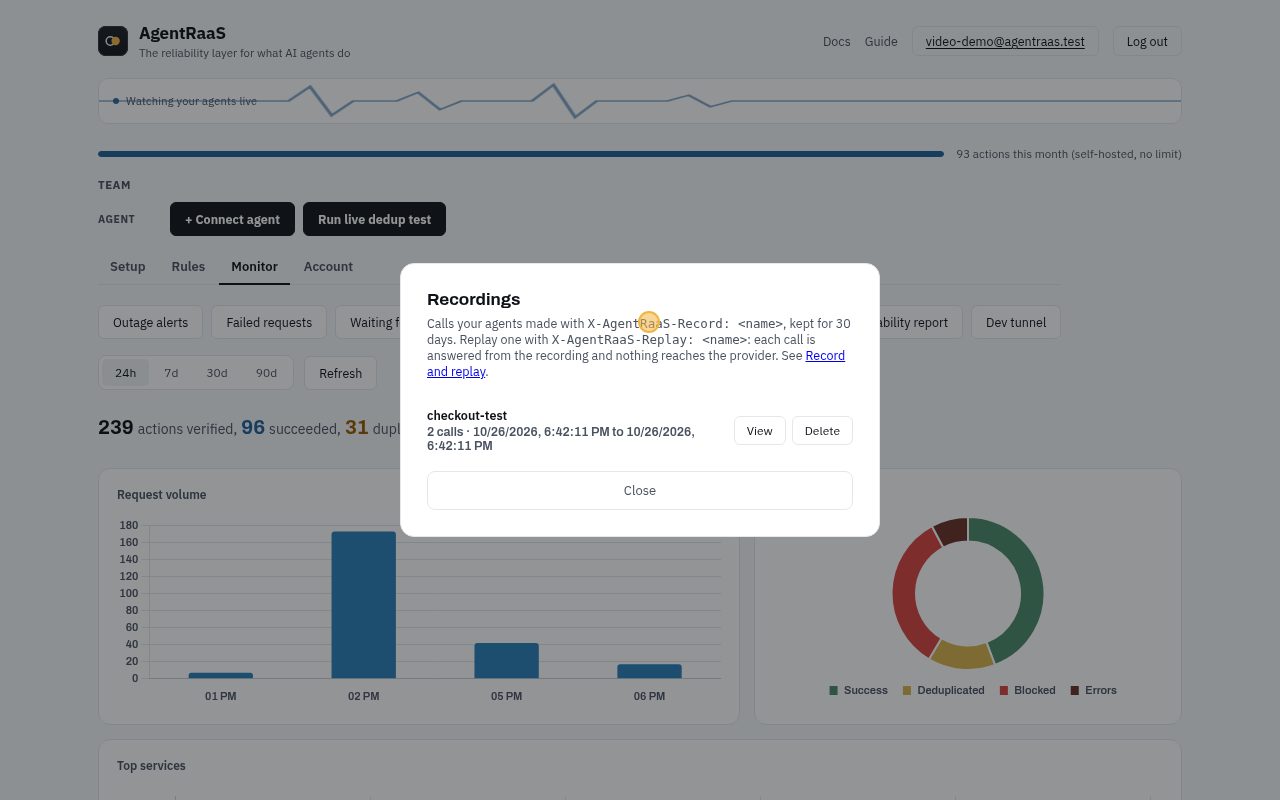
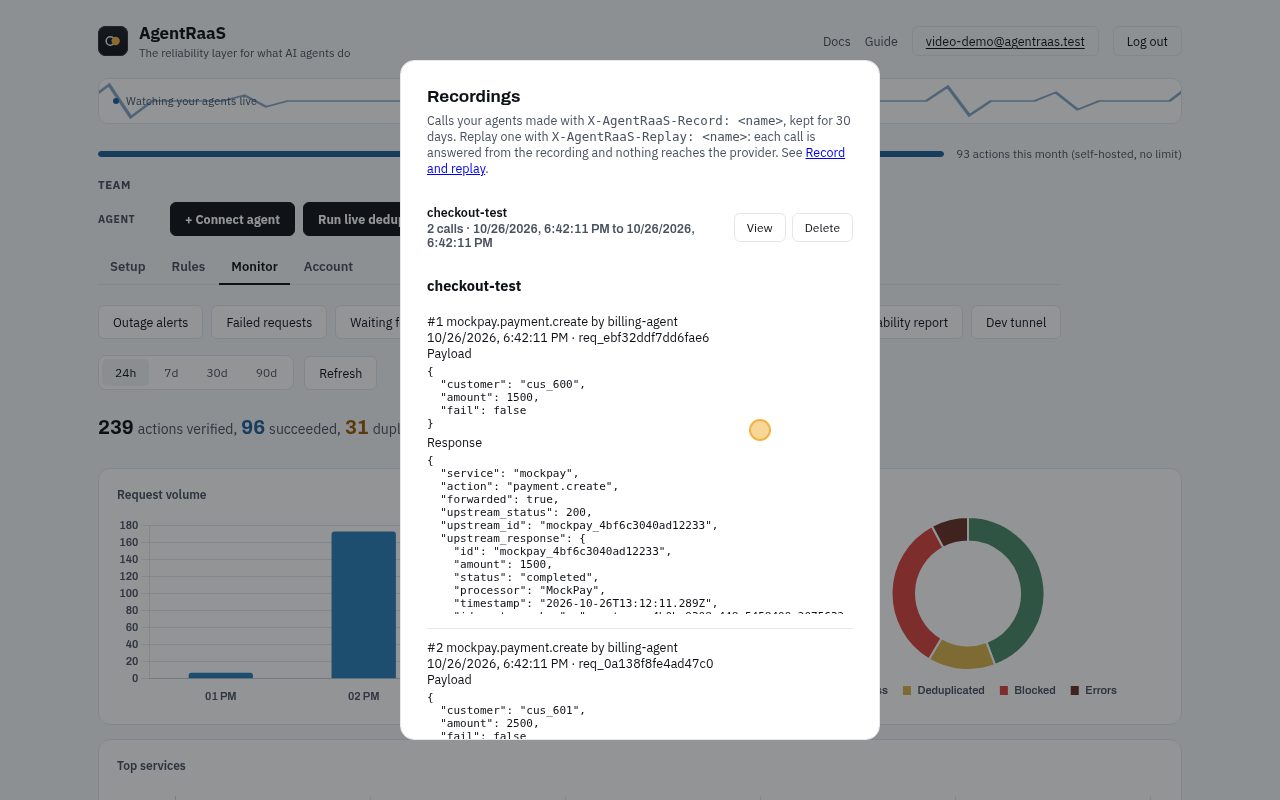
Record a run against the real providers once, then replay it in tests: every call is answered from the recording and nothing reaches the provider.
In the dashboard, step by step
No code needed. A recording of these exact clicks, then each step with a picture:
- Monitor tab, Recordings: each recorded run, how many calls it made and when.
- Click View to see every call and its answer. A replay is answered from here, so nothing reaches the real service.
With the API or in code
- Python: Client(..., record="refund-flow") or replay="refund-flow", run_id=...
- JS: record / replay / runId in the Client options
Every case
Click a case to see the request and the real response.
Record call 1200
Runs for real and is kept under the name checkout-flow.
curl -X POST "$AGENTRAAS_URL/v1/webhook/org_acme/billing-agent" \
  -H "Authorization: Bearer $AGENTRAAS_KEY" -H "Content-Type: application/json" \
  -H "X-AgentRaaS-Record: checkout-flow" \
  -d '{"service": "mockpay", "action": "payment.create", "payload": {"customer": "cus_901", "amount": 2100, "fail": false}}'
{
"forwarded": true,
"upstream_id": "mockpay_c94c922f46021634",
"upstream_response": {
"id": "mockpay_c94c922f46021634",
"amount": 2100,
"status": "completed"
},
"reqId": "req_8200590d1fbf9ba2"
}Record call 2200
Also kept, in order.
curl -X POST "$AGENTRAAS_URL/v1/webhook/org_acme/billing-agent" \
  -H "Authorization: Bearer $AGENTRAAS_KEY" -H "Content-Type: application/json" \
  -H "X-AgentRaaS-Record: checkout-flow" \
  -d '{"service": "mockpay", "action": "payment.create", "payload": {"customer": "cus_901", "amount": 2200, "fail": false}}'
{
"forwarded": true,
"upstream_id": "mockpay_19624f21d4ca4e19",
"upstream_response": {
"id": "mockpay_19624f21d4ca4e19",
"amount": 2200,
"status": "completed"
},
"reqId": "req_5824d34e9c176d21"
}Replay call 1200
Answered from the recording: same payment id, nothing sent.
curl -X POST "$AGENTRAAS_URL/v1/webhook/org_acme/billing-agent" \
  -H "Authorization: Bearer $AGENTRAAS_KEY" -H "Content-Type: application/json" \
  -H "X-AgentRaaS-Replay: checkout-flow" \
  -H "X-AgentRaaS-Run-Id: ci-run-1" \
  -d '{"service": "mockpay", "action": "payment.create", "payload": {"customer": "cus_901", "amount": 2100, "fail": false}}'
{
"forwarded": true,
"upstream_id": "mockpay_c94c922f46021634",
"upstream_response": {
"id": "mockpay_c94c922f46021634",
"amount": 2100,
"status": "completed"
},
"reqId": "req_b212dceaf6a784d3",
"replay": {
"recording": "checkout-flow",
"position": 1,
"payload_matches": true
}
}Replay call 2 with a changed payload200
Still answered, but payload_matches is false, so a test can fail on it.
curl -X POST "$AGENTRAAS_URL/v1/webhook/org_acme/billing-agent" \
  -H "Authorization: Bearer $AGENTRAAS_KEY" -H "Content-Type: application/json" \
  -H "X-AgentRaaS-Replay: checkout-flow" \
  -H "X-AgentRaaS-Run-Id: ci-run-1" \
  -d '{"service": "mockpay", "action": "payment.create", "payload": {"customer": "cus_901", "amount": 9999, "fail": false}}'
{
"forwarded": true,
"upstream_id": "mockpay_19624f21d4ca4e19",
"upstream_response": {
"id": "mockpay_19624f21d4ca4e19",
"amount": 2200,
"status": "completed"
},
"reqId": "req_f33e1e56bed8911c",
"replay": {
"recording": "checkout-flow",
"position": 2,
"payload_matches": false
}
}A call the recording does not have404
404: the agent now makes more calls than it did when recorded.
curl -X POST "$AGENTRAAS_URL/v1/webhook/org_acme/billing-agent" \
  -H "Authorization: Bearer $AGENTRAAS_KEY" -H "Content-Type: application/json" \
  -H "X-AgentRaaS-Replay: checkout-flow" \
  -H "X-AgentRaaS-Run-Id: ci-run-1" \
  -d '{"service": "mockpay", "action": "payment.create", "payload": {"customer": "cus_901", "amount": 2300, "fail": false}}'
{
"error": "Recording \"checkout-flow\" has no call #3 to mockpay.payment.create. The agent made a call the recording doesn't have.",
"reqId": "req_05f0c9f8ebf6a47f"
}Rules as code
Keep rules in a YAML file in your repo, review changes like code, and apply them from CI. agentraas apply makes the server match the file; running it twice changes nothing.
Set it up
pip install "agentraas[apply]"agentraas.yaml:
apiVersion: agentraas.io/v1alpha1
kind: ValidationRule
metadata: {name: sane-amounts, org: org_acme}
spec: {service: mockpay, action: payment.create, fields: {amount: {type: number, max: 10000}}}
---
apiVersion: agentraas.io/v1alpha1
kind: SpendCap
metadata: {name: refund-budget, org: org_acme}
spec: {service: mockpay, action: payment.refund, window: day, maxCalls: 20, onExceed: block}- AGENTRAAS_URL=http://localhost:13000
- AGENTRAAS_EMAIL / AGENTRAAS_PASSWORD: a user who can change the org
Every case
Click a case to see the request and the real response.
Preview the planexit 0
--dry-run prints what would change and changes nothing.
$ agtrs apply -f agentraas.yaml --dry-run
+ ValidationRule org_acme mockpay.payment.create (sane-amounts)
+ SpendCap org_acme mockpay.payment.refund (refund-budget)
Apply itexit 0
Creates what is missing.
$ agtrs apply -f agentraas.yaml
+ ValidationRule org_acme mockpay.payment.create (sane-amounts)
+ SpendCap org_acme mockpay.payment.refund (refund-budget)
Apply again: nothing to doexit 0
The server already matches the file.
$ agtrs apply -f agentraas.yaml
no changes
Change a limit in the fileexit 0
max 10000 becomes 5000; apply replaces the rule that changed.
$ agtrs apply -f agentraas.yaml   # after changing max: 10000 to max: 5000
+ ValidationRule org_acme mockpay.payment.create (sane-amounts)
Remove a rule with --pruneexit 0
Without --prune, rules missing from the file are left alone. With it, they are deleted.
$ agtrs apply -f agentraas.yaml --prune   # after deleting the SpendCap from the file
- SpendCap org_acme mockpay.payment.refund (id 288)
A mistake fails the CI jobexit 1
An unknown kind is reported and the command exits non-zero, so the pipeline stops.
$ agtrs apply -f agentraas.yaml   # with a typo: kind: SpendLimit
agentraas.yaml document 2: kind must be one of DedupRule, ValidationRule, ActionPolicy, SpendCap
Library mode and the chaos tester
No server at all: a decorator makes a function with side effects run once, even when it is retried, and the chaos tester finds the calls that would run twice.
Set it up
pip install agentraasEvery case
Click a case to see the request and the real response.
Wrap a function: a retry runs it onceexit 0
The second call with the same arguments returns the stored result; the function body does not run.
lib_demo.py
from agentraas.local import exactly_once

calls = 0

@exactly_once()                 # state in a local SQLite file
def charge(customer, amount):
    global calls
    calls += 1
    print(f"  charging {customer} {amount}")
    return f"ch_{customer}_{amount}"

print(charge("cus_42", 4200))   # runs
print(charge("cus_42", 4200))   # retry: cached, no second charge
print(charge("cus_42", 900))    # different arguments: runs
print("times charged:", calls)
$ python lib_demo.py
charging cus_42 4200
ch_cus_42_4200
ch_cus_42_4200
charging cus_42 900
ch_cus_42_900
times charged: 2A failure is not cachedexit 0
If the function raises, nothing is stored, so the retry runs for real.
err_demo.py
from agentraas.local import exactly_once

attempts = 0

@exactly_once()
def send_invoice(customer):
    global attempts
    attempts += 1
    if attempts == 1:
        raise TimeoutError("provider timed out")
    return f"inv_{customer}"

for _ in range(2):
    try:
        print(send_invoice("cus_77"))
    except TimeoutError as e:
        print("  failed:", e, "(not cached, a retry runs again)")
print("attempts:", attempts)
$ python err_demo.py
failed: provider timed out (not cached, a retry runs again)
inv_cus_77
attempts: 2The chaos tester finds a double chargeexit 1
It lets each write run, then drops the response. The agent retries without an idempotency key, and the charge runs twice.
agent.py
import os, requests
API = os.environ["AGENTRAAS_CHAOS_URL"]

def charge(customer, amount):
    for attempt in range(3):          # retry on network errors
        try:
            return requests.post(f"{API}/v1/charges",
                                 data={"customer": customer, "amount": amount}, timeout=5).json()
        except requests.RequestException:
            continue

charge("cus_42", 4200)
$ agentraas chaos --mock -- python agent.py
agentraas-chaos listening on http://127.0.0.1:8787 -> mock (fault: lost-response)
agentraas-chaos: 2 write requests, 1 responses dropped after execution
DUPLICATES: 1 action(s) executed more than once
2x POST /v1/charges (body sha256 a32934913660)
Fix: send an Idempotency-Key header that stays the same across retries, for
providers that honor one. With agentraas.local.exactly_once, give the function an
`idempotency_key` parameter and send it as that header; for providers without
idempotency support, route the call through an AgentRaaS server.With exactly_once and an idempotency key it passesexit 0
The retry carries the same key, so nothing doubles. Exit code 0, so CI passes.
agent_fixed.py
import os, requests
from agentraas.local import exactly_once
API = os.environ["AGENTRAAS_CHAOS_URL"]

@exactly_once()
def charge(customer, amount, idempotency_key=None):
    for attempt in range(3):
        try:
            return requests.post(f"{API}/v1/charges",
                                 data={"customer": customer, "amount": amount},
                                 headers={"Idempotency-Key": idempotency_key}, timeout=5).json()
        except requests.RequestException:
            continue

charge("cus_42", 4200)
$ agentraas chaos --mock -- python agent_fixed.py
agentraas-chaos listening on http://127.0.0.1:8787 -> mock (fault: lost-response)
agentraas-chaos: 2 write requests, 1 responses dropped after execution
No duplicates: every retried write was deduplicated or never retried.
Protected by an idempotency key: 1 retryLangChain and LangGraph tools
Wrap the tools that have side effects. When the model calls one again with the same arguments, or the graph re-runs after a crash, the stored result comes back instead of a second action.
Set it up
pip install "agentraas[langchain]"- CrewAI: from agentraas.crewai import protect_tool, same idea
- Vercel AI SDK: protectTools in the npm package
Every case
Click a case to see the request and the real response.
Protect a toolexit 0
Use the protected tool wherever the agent takes its tools: create_react_agent, ToolNode, an AgentExecutor.
lc_demo.py
from langchain_core.tools import tool
from agentraas.langchain import protect_tool

sent = []

@tool
def send_refund(customer: str, amount: int) -> str:
    """Refund a customer."""
    sent.append((customer, amount))
    return f"refund {len(sent)} sent to {customer}"

safe = protect_tool(send_refund)

print(safe.invoke({"customer": "cus_9", "amount": 500}))   # runs
print(safe.invoke({"customer": "cus_9", "amount": 500}))   # model repeats itself: stored result
print(safe.invoke({"customer": "cus_9", "amount": 700}))   # different arguments: runs
print("refunds actually sent:", len(sent))
$ python lc_demo.py
refund 1 sent to cus_9
refund 1 sent to cus_9
refund 2 sent to cus_9
refunds actually sent: 2MCP: scan and wrap a server
agentraas scan lists which tools of an MCP server can move money, delete data or send messages. agentraas wrap puts exactly-once in front of the server, so a retrying or looping model cannot run the same write twice.
Set it up
pip install agentraasclaude_desktop_config.json:
{
  "mcpServers": {
    "billing": {
      "command": "uvx",
      "args": [
        "agentraas",
        "wrap",
        "--",
        "python",
        "billing_server.py"
      ]
    }
  }
}
Every case
Click a case to see the request and the real response.
Scan the serverexit 0
Starts it, asks only for its tool list, and sorts the tools by risk. Nothing is called.
billing_server.py
import json, sys, collections
# A small demo billing MCP server (stdio), written for this tutorial.
count = collections.Counter()
TOOLS = [
    {"name": "get_invoice", "description": "Look up an invoice", "inputSchema": {"type": "object"}},
    {"name": "update_note", "description": "Edit a customer note", "inputSchema": {"type": "object"}},
    {"name": "send_receipt", "description": "Email a receipt", "inputSchema": {"type": "object"}},
    {"name": "create_refund", "description": "Refund a payment", "inputSchema": {"type": "object"}},
    {"name": "delete_customer", "description": "Delete a customer", "inputSchema": {"type": "object"}},
]
for line in sys.stdin:
    msg = json.loads(line)
    if "id" not in msg:
        continue
    m, rid = msg["method"], msg["id"]
    if m == "initialize":
        res = {"protocolVersion": "2025-06-18", "capabilities": {"tools": {}}, "serverInfo": {"name": "billing-demo", "version": "1"}}
    elif m == "tools/list":
        res = {"tools": TOOLS}
    elif m == "tools/call":
        name = msg["params"]["name"]; count[name] += 1
        res = {"content": [{"type": "text", "text": f"{name} ran (time #{count[name]})"}], "isError": False}
    else:
        res = {}
    sys.stdout.write(json.dumps({"jsonrpc": "2.0", "id": rid, "result": res}) + "\n"); sys.stdout.flush()
$ agentraas scan -- python billing_server.py
billing_server.py (python billing_server.py)
5 tools: 3 high risk, 1 write, 1 read-only
HIGH deletes delete_customer (name: delete)
HIGH money create_refund (name: refund)
HIGH sends send_receipt (name: send)
MEDIUM writes update_note (name: update)
Fix duplicates and get an audit log: agentraas wrap -- python billing_server.py
High-risk tools can spend money, delete data or reach people. To block, cap or hold them for
human approval before they run, route them through an AgentRaaS server: https://agentraas.io/mcp-scanScan in CIexit 0
--fail-on high exits non-zero when a high-risk tool is present, so a new dangerous tool needs a review.
$ agentraas scan --fail-on high -- python billing_server.py; echo "exit code: $?"

billing_server.py  (python billing_server.py)
  5 tools: 3 high risk, 1 write, 1 read-only
    HIGH    deletes    delete_customer  (name: delete)
    HIGH    money      create_refund  (name: refund)
    HIGH    sends      send_receipt  (name: send)
    MEDIUM  writes     update_note  (name: update)
  Fix duplicates and get an audit log: agentraas wrap -- python billing_server.py

High-risk tools can spend money, delete data or reach people. To block, cap or hold them for
human approval before they run, route them through an AgentRaaS server: https://agentraas.io/mcp-scan
exit code: 1
A write tool runsexit 0
Through agentraas wrap, the first refund runs.
$ tools/call create_refund {"payment": "pay_1", "amount": 500}
create_refund ran (time #1)
The model repeats it: answered from the recordexit 0
Same tool, same arguments inside the window (10 minutes by default): the stored result, marked deduplicated.
$ tools/call create_refund {"payment": "pay_1", "amount": 500}
create_refund ran (time #1)   _meta: {"agentraas/deduplicated": true}
Different arguments runexit 0
Another refund is another action.
$ tools/call create_refund {"payment": "pay_2", "amount": 500}
create_refund ran (time #2)
Read tools always runexit 0
get_* and other read-only tools are never deduplicated, so lookups stay fresh.
$ tools/call get_invoice {"id": "inv_1"}
get_invoice ran (time #1)
...every timeexit 0
$ tools/call get_invoice {"id": "inv_1"}
get_invoice ran (time #2)
Every call is in the audit logexit 0
~/.agentraas/mcp-audit.jsonl by default (--log to change it).
$ tail -n 3 ~/.agentraas/mcp-audit.jsonl
{"ts": "2026-10-26T14:50:47+0530", "server": "/tmp/claude-1000/-home-sumedh-agentraas/a4302135-38e1-4e8f-b96b-f316713680b0/scratchpad/video/venv/bin/python billing_server.py", "tool": "create_refund", "args_sha256": "e7e3c81b9ab9325474baa6b5d497f8622bae2ed419742be95f77459f881d6601", "outcome": "executed", "ms": 3.9}
{"ts": "2026-10-26T14:50:47+0530", "server": "/tmp/claude-1000/-home-sumedh-agentraas/a4302135-38e1-4e8f-b96b-f316713680b0/scratchpad/video/venv/bin/python billing_server.py", "tool": "get_invoice", "args_sha256": "5e777ee2baf1961980874ddb6a0d40b73e7d63d3db7e2d6760b6e88b625ab18d", "outcome": "passthrough", "ms": 0.0}
{"ts": "2026-10-26T14:50:47+0530", "server": "/tmp/claude-1000/-home-sumedh-agentraas/a4302135-38e1-4e8f-b96b-f316713680b0/scratchpad/video/venv/bin/python billing_server.py", "tool": "get_invoice", "args_sha256": "5e777ee2baf1961980874ddb6a0d40b73e7d63d3db7e2d6760b6e88b625ab18d", "outcome": "passthrough", "ms": 0.0}
Recipes for real services
How to connect a service people already use, what an agent can do with it, and one rule worth adding first. The rule bodies were saved against a real server; the calls need your own key, so they show no response.
Stripe
Charge cards, refund, manage customers and subscriptions.
Connect it
Setup tab, Connect a service, pick Stripe and paste the Secret key. Starts with sk_test_ or sk_live_. Try a test key first. Where to find it.
A charge can be undone (refunded) from Undo actions.
What your agent can call
charge.create: needs currency, customer (can be undone)customer.createcharge.refund: needs chargepayment_intent.create: needs amount, currencypayment_intent.refund: needs payment_intentsubscription.create: needs customer, items (can be undone)subscription.cancel: needs idinvoice.create: needs customer
A first rule
Hold charges above 50000 for a person. Stripe counts in cents, so that is 500.00 USD. In the dashboard: Rules tab. With the API:
POST /api/v1/hitl-rules
{
  "org_id": "org_acme",
  "service": "stripe",
  "action": "charge.create",
  "field": "amount",
  "operator": "gt",
  "threshold": 50000
}
A call
curl -X POST "$AGENTRAAS_URL/v1/webhook/org_acme/billing-agent" \
  -H "Authorization: Bearer $AGENTRAAS_KEY" -H "Content-Type: application/json" \
  -d '{"service": "stripe", "action": "charge.create", "payload": {"amount": 2500, "currency": "usd", "customer": "cus_123"}}'
Slack
Post and delete messages.
Connect it
Setup tab, Connect a service, pick Slack and paste the Bot token. Starts with xoxb-. Invite the bot to the channel. Where to find it.
Invite the bot to each channel first. A posted message can be undone (deleted).
What your agent can call
message.post: needs channel, text (can be undone)message.postEphemeral: needs channel, user, textmessage.delete: needs channel, ts
A first rule
Post only to #support and #alerts. Any other channel is blocked, and the error names the rule. In the dashboard: Rules tab. With the API:
POST /api/v1/action-policies
{
  "org_id": "org_acme",
  "service": "slack",
  "action": "message.post",
  "effect": "require",
  "fields": {
    "channel": {
      "enum": [
        "#support",
        "#alerts"
      ]
    }
  }
}
A call
curl -X POST "$AGENTRAAS_URL/v1/webhook/org_acme/billing-agent" \
  -H "Authorization: Bearer $AGENTRAAS_KEY" -H "Content-Type: application/json" \
  -d '{"service": "slack", "action": "message.post", "payload": {"channel": "#support", "text": "Ticket 4182 was refunded."}}'
Resend
Send email.
Connect it
Setup tab, Connect a service, pick Resend and paste the API key. Starts with re_. Send from a domain you verified in Resend. Where to find it.
Send from a domain you verified in Resend. An email cannot be undone, so this is a good place for a rule.
What your agent can call
email.send: needs from, to, subject
A first rule
Send only to addresses at acme.com, so an agent can never email outside the company. In the dashboard: Rules tab. With the API:
POST /api/v1/action-policies
{
  "org_id": "org_acme",
  "service": "resend",
  "action": "email.send",
  "effect": "require",
  "fields": {
    "to": {
      "domains": [
        "acme.com"
      ]
    }
  }
}
A call
curl -X POST "$AGENTRAAS_URL/v1/webhook/org_acme/billing-agent" \
  -H "Authorization: Bearer $AGENTRAAS_KEY" -H "Content-Type: application/json" \
  -d '{"service": "resend", "action": "email.send", "payload": {"from": "help@acme.com", "to": "jo@acme.com", "subject": "Your refund", "text": "It is on its way."}}'
GitHub
Open, comment on and update issues.
Connect it
Setup tab, Connect a service, pick GitHub and paste the Fine-grained personal access token. Give it Issues: read and write on the repositories your agent uses. Where to find it.
A fine-grained token with Issues: read and write on just the repositories the agent uses.
What your agent can call
issue.create: needs owner, repo, titleissue.comment: needs owner, repo, issue_number, bodyissue.update: needs owner, repo, issue_number
A first rule
At most 20 new issues a day, so an agent stuck in a loop cannot flood the repository. In the dashboard: Rules tab. With the API:
POST /api/v1/spend-cap-rules
{
  "org_id": "org_acme",
  "service": "github",
  "action": "issue.create",
  "window": "day",
  "max_calls": 20,
  "on_exceed": "block"
}
A call
curl -X POST "$AGENTRAAS_URL/v1/webhook/org_acme/billing-agent" \
  -H "Authorization: Bearer $AGENTRAAS_KEY" -H "Content-Type: application/json" \
  -d '{"service": "github", "action": "issue.create", "payload": {"owner": "your-org", "repo": "your-repo", "title": "Checkout fails on Safari"}}'
Razorpay
Create payment orders (India).
Connect it
Setup tab, Connect a service, pick Razorpay and paste the Key ID and Key secret. Where to find it.
Razorpay takes two values: the Key ID and the Key secret. Use test mode keys while you try it.
What your agent can call
payment.create: needs currency
A first rule
Hold orders above 500000 for a person. Razorpay counts in paise, so that is 5,000 rupees. In the dashboard: Rules tab. With the API:
POST /api/v1/hitl-rules
{
  "org_id": "org_acme",
  "service": "razorpay",
  "action": "payment.create",
  "field": "amount",
  "operator": "gt",
  "threshold": 500000
}
A call
curl -X POST "$AGENTRAAS_URL/v1/webhook/org_acme/billing-agent" \
  -H "Authorization: Bearer $AGENTRAAS_KEY" -H "Content-Type: application/json" \
  -d '{"service": "razorpay", "action": "payment.create", "payload": {"amount": 49900, "currency": "INR"}}'
Paypal
Create checkout orders.
Connect it
Setup tab, Connect a service, pick Paypal and paste the access token.
PayPal is not in Connect a service yet: save an access token under Setup, Credentials (service paypal). PayPal access tokens expire, so it has to be replaced when it does.
What your agent can call
order.create: needs intent, purchase_units
A first rule
Hold every order for a person. The amount sits inside purchase_units, where amount rules cannot reach it, so this rule has no threshold. In the dashboard: Rules tab. With the API:
POST /api/v1/hitl-rules
{
  "org_id": "org_acme",
  "service": "paypal",
  "action": "order.create"
}
A call
curl -X POST "$AGENTRAAS_URL/v1/webhook/org_acme/billing-agent" \
  -H "Authorization: Bearer $AGENTRAAS_KEY" -H "Content-Type: application/json" \
  -d '{"service": "paypal", "action": "order.create", "payload": {"intent": "CAPTURE", "purchase_units": [{"amount": {"currency_code": "USD", "value": "25.00"}}]}}'